
CS Queue Bot
Live Telegram bot for queue management · 2025
An automated Telegram bot for managing CS Internship queue onboarding, moderation, admin tasks, and Azure DevOps candidate tracking.
Gallery
Features
- Checks Telegram usernames and guides new members through onboarding
- Detects message spam and applies moderation rules automatically
- Creates and links Azure DevOps work items from bot commands
- Supports scheduled messages, automated tests, releases, and update workflows
CS Queue Bot story
Continue reading
At CS Internship, we'd been working on redesigning the program's admission process for several months. During that time, I suggested replacing one of the program's old, manual processes with a fully automated system.
CS Internship had a Telegram group called the Waiting Queue, where people interested in joining the program would gather and gradually get their turn for an admission interview.
For years, the process had worked like this: anyone who wanted to join the Waiting Queue had to contact the person managing it that week, who would then manually add them to the group. After that, the queue manager would explain what they needed to do to prepare for their interview and go through the admission process.
I came up with an idea to make this entire process automated and much easier.
My suggestion was to make the Waiting Queue's invitation link publicly available on the program's introduction page, which was hosted on Virgool at the time. Anyone interested in joining could first read that page and, if they wanted to continue, join the Waiting Queue through the link.
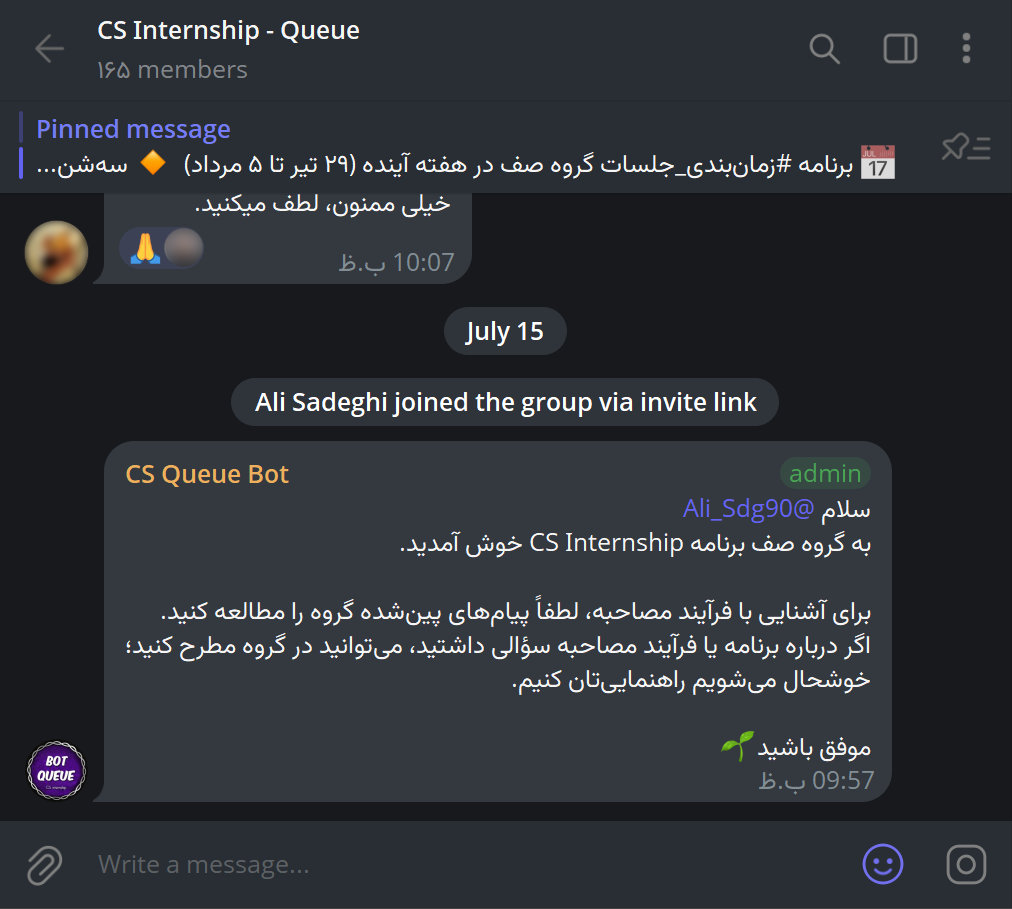
Then we'd have a Telegram bot that would detect whenever someone new joined the group, welcome them, and explain what they needed to do to go through the admission and interview process.
This change could make a huge difference for the program. One of the major bottlenecks in the admission process would be completely removed and replaced with an automated system. People could start their own admission journey without having to wait for the queue manager or anyone else.
I proposed the idea, and once it was approved, I started building the Telegram bot.
This was the second Telegram bot I'd ever built, and the first one I was creating for CS Internship. I'd really started enjoying building Telegram bots, and I remember working on this project with a lot of excitement.
I built the first version, which could welcome new applicants and guide them through the steps needed to begin their interview process.
Then I started adding a few more features to take care of the Waiting Queue and keep the group organized.
For example, I didn't want people to be able to add other bots to the group. So I built a feature that automatically removed any bot that joined and recorded information about that bot and the person who had added it in the group.
I also added a spam detection system. If someone sent more than a certain number of messages within a very short period, like a single second, they'd be identified as a spammer and automatically removed from the group.
I even added a feature for situations where someone tried to add my bot to another group. The bot would explain that it was built specifically for CS Internship and send a custom-generated link that the person could use to join the program's official Waiting Queue. Information about the person who tried to add the bot, along with details about that group, would also be recorded in the system logs.
But one of the most important features I added was integrating the bot with the program's Azure DevOps.
For this part, I designed a new Board, a Feature, and a Backlog template.
The idea was that whenever a new applicant joined the Waiting Queue, the bot would immediately create a Backlog for them in a specific location on the program's Azure DevOps board.
The Backlog would be filled with the person's name and Telegram username. Its Description would also include a link to the welcome message the bot had sent when they joined the group.
These Backlogs were going to be used throughout the interview process. From then on, every applicant who joined the Waiting Queue and started the admission process would have their own Backlog.
Whenever someone completed an interview stage and moved on to the next one, the person responsible for that interview would update their Backlog to reflect their current status in the admission process.
The idea behind this system, designing the board, creating the templates, and implementing the integration with the bot were all my work. :)
It's one of the parts of this project I'm especially proud of.
There was another issue, too. We needed a unique identifier for each applicant so we could identify them and track their progress through the different stages.
I decided to use each person's Telegram username for this and store it in the title of their Backlog.
But what if someone joined the group without having a Telegram username?
So I added another feature that would detect when a new member didn't have a username and send them a message explaining that they needed to set one up before they could enter the registration and interview process.
I even included a YouTube video showing them how to do it. Once they'd created their username, they had to let us know in the group so they could continue with the interview process.
The first version of the bot worked really well. I introduced it, and as the new admission process went live, the bot started doing its job too.
About a month later, another need came up.
We needed people attending online sessions to share their Telegram usernames with the session organizers before the session started.
So I added another feature to the bot.
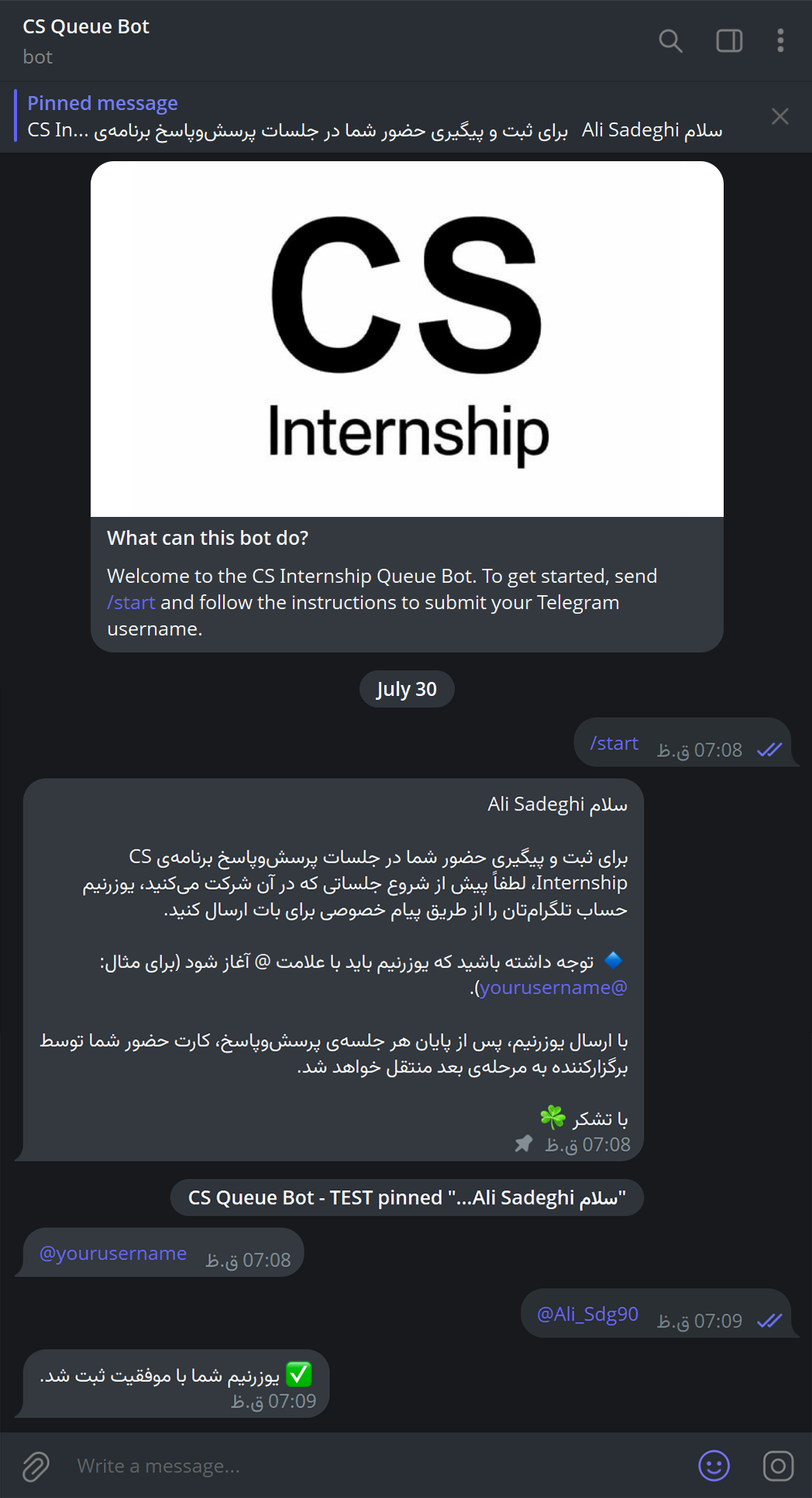
This time, applicants would open a private chat with the bot. It would welcome them and explain how to submit their Telegram username to the program.
Once they sent their username, they'd receive a confirmation message. At the same time, their information would be forwarded to the mentors' group so the mentor hosting the session could access the usernames of the participants.
I also added a banning feature for this part. If someone tried to abuse the ability to send messages to the mentors' group, the mentors could ban that person so none of their future messages would be forwarded to the group.
The interesting thing was that during the roughly 1.5 years I was still part of the program and the bot was running, we never actually needed to use that feature. Nobody abused the messaging system, there were no spam incidents, and nobody tried to add another bot to the group.
I'm glad none of those things happened, but if they had, the system was ready to handle them. :)
So, in short, what looked like a bot that simply said hello to new members was actually taking care of all kinds of things in the background!
From welcoming and guiding applicants to preventing spam, controlling other bots joining the group, automatically creating Backlogs in Azure DevOps, and helping session organizers.
All of this was meant to keep the group organized and make the admission and interview process easier for applicants.
Just like the other two projects I'd built for CS, I also set up a complete testing and CI/CD system for this bot.
From the beginning, I knew this wasn't going to be a bot I'd simply build and hand over to the program. It might still be in use years after I left, and it could need changes and updates along the way.
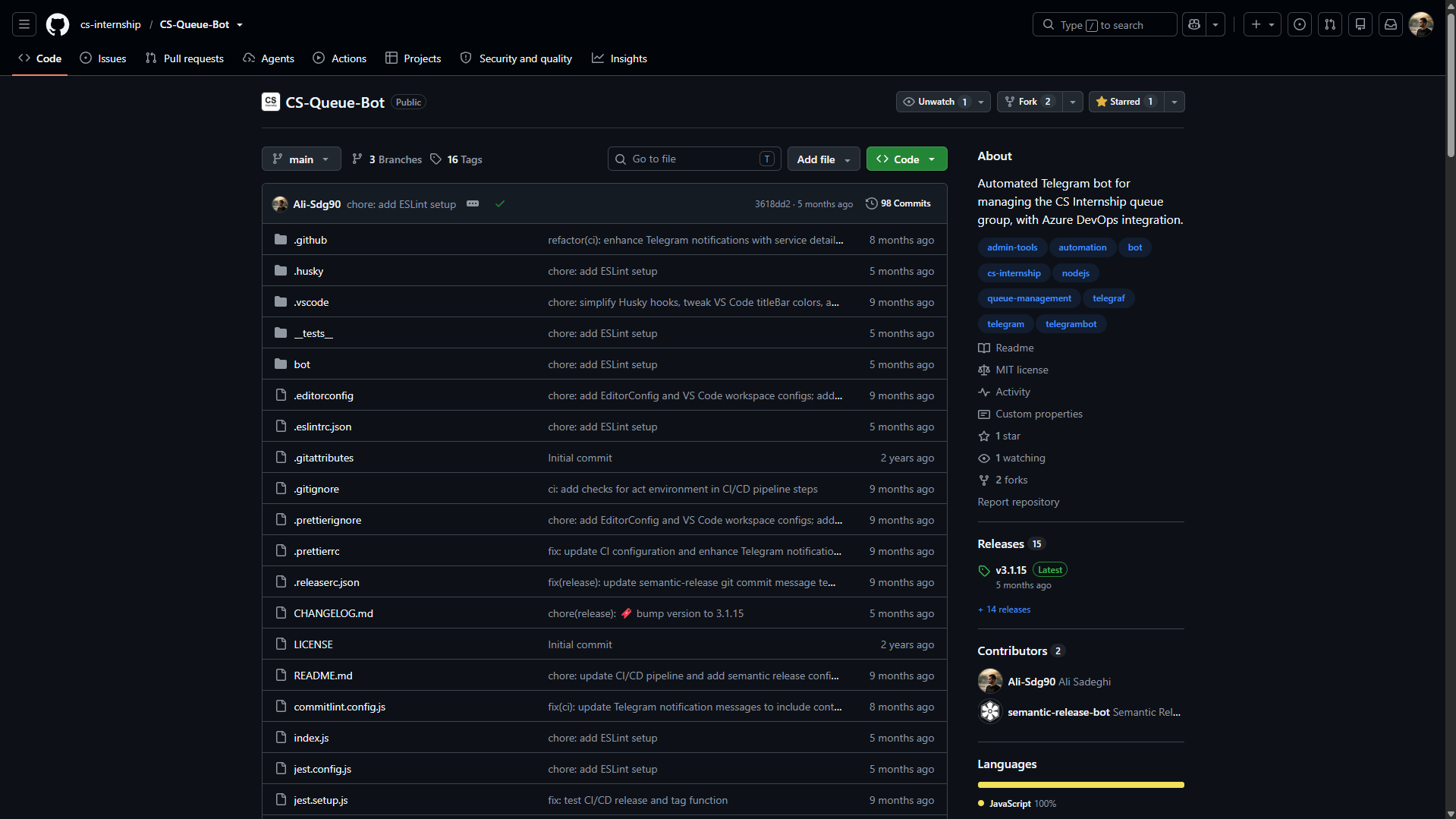
So I wrote thorough, detailed test cases using Jest and also used Husky and Semantic Release.
Here's how it worked: whenever someone tried to make a commit, Husky would first check whether the commit message followed the Semantic Release conventions.
Then all the test cases would run through Jest, and the commit would only be allowed if every test passed and everything was working correctly.
After the commit was made, the CI/CD pipeline would build and test the project again. If every step succeeded, it would create a new version and release it.
The new version would then be updated automatically. Finally, a Telegram bot would announce in the program's mentors group who had made the commit and which project it was made to.
I'd put a lot of work into this part because it mattered to me that maintaining and developing the bot would remain easy and reliable even after I left.
In the end, I'd built a system to take care of the program's admission process, and that system had its own collection of tools to take care of its operation and maintenance.
A system built by someone who cared about making something that could do its job professionally, completely, and even go beyond what it was originally supposed to do.
The bot became one of the program's most important tools and continued doing its job even after I left CS Internship.
It's still there, doing what it was built to do, taking care of the Waiting Queue and helping new applicants begin their journey into the program.
I'm proud of what it is :)
تو CS Internship چندین ماه درگیر بازطراحی فرایند ورود به برنامه بودیم. تو همین مدت، یه پیشنهادی مطرح کردم که قرار بود یکی از کارهای قدیمی و دستی برنامه رو بهکل با یه سیستم اتوماتیک جایگزین کنیم.
برنامه CS Internship یه گروه به اسم گروه صف داشت که افرادی که متقاضی ورود به برنامه بودن، واردش میشدن و کمکم نوبت مصاحبهشون برای ورود به برنامه میرسید.
این فرایند سالها به این شکل بود که هر کسی میخواست وارد گروه صف بشه، باید با مسئول صف اون هفته ارتباط برقرار میکرد تا اون شخص بهصورت دستی به گروه اضافهش کنه. بعد از اضافه شدن هم مسئول صف باید براش توضیح میداد که برای آماده شدن و گذروندن مراحل مصاحبه چه کارهایی لازمه انجام بده.
من یه ایده مطرح کردم که این قسمت رو بهکل اتوماتیک و راحتتر کنیم.
پیشنهادم این بود که لینک ورود به گروه صف رو بهصورت عمومی تو صفحه معرفی برنامه قرار بدیم، که اون موقع روی ویرگول بود. هر کسی که میخواست وارد برنامه بشه، اول میرفت اون صفحه رو میخوند و اگه علاقهمند بود، از طریق لینک وارد گروه صف میشد.
بعد یه بات تلگرام داشته باشیم که بهمحض ورود یه عضو جدید، متوجه بشه، بهش خوشامد بگه و توضیح بده که برای گذروندن مراحل ورود و مصاحبه باید چه کارهایی انجام بده.
این تغییر میتونست مزیت خیلی بزرگی برای برنامه داشته باشه. یکی از باتلنکهای مهم فرایند ورود بهکل حذف میشد و یه سیستم اتوماتیک جاش رو میگرفت. افراد میتونستن بدون اینکه منتظر مسئول صف یا شخص دیگهای بمونن، خودشون مسیر ورود و مصاحبهشون رو شروع کنن.
ایده رو مطرح کردم و بعد از تاییدش رفتم سراغ ساخت بات تلگرام.
این دومین بات تلگرامیای بود که میساختم و اولین باتی بود که برای CS Internship طراحی میکردم. از ساخت باتهای تلگرامی خیلی خوشم اومده بود و یادمه با هیجان زیادی روی این پروژه کار کردم.
نسخه اولیه بات رو ساختم و میتونست به متقاضیهای جدید خوشامد بگه و راهنماییشون کنه که چجوری وارد فرایند مصاحبه بشن.
بعد شروع کردم به اضافه کردن یه سری قابلیت دیگه برای مراقبت از گروه صف و حفظ نظم گروه.
مثلا نمیخواستم کسی بتونه بات دیگهای رو به گروه اضافه کنه. برای همین یه قابلیتی ساختم که اگه باتی وارد گروه میشد، بهصورت خودکار از گروه اخراج میشد و اطلاعات اون بات و کسی که اضافهش کرده بود هم تو گروه ثبت میشد.
یه سیستم تشخیص اسپم هم اضافه کردم. اگه کسی تو یه بازه زمانی خیلی کوتاه، مثلا تو یک ثانیه، بیشتر از تعداد مشخصی پیام میفرستاد، بهعنوان اسپمر شناسایی میشد و بات بهصورت خودکار از گروه اخراجش میکرد.
حتی برای زمانی که کسی میخواست بات رو به یه گروه دیگه اضافه کنه هم یه قابلیت گذاشتم. بات توضیح میداد که فقط برای برنامه CS Internship ساخته شده و همراه این پیام، یه لینک کاستوم هم میفرستاد که فرد میتونست از طریقش وارد گروه اصلی صف برنامه بشه. اطلاعات کسی که سعی کرده بود بات رو به گروه اضافه کنه هم همراه اطلاعات اون گروه، تو لاگ سیستم ثبت میشد.
ولی یکی از مهمترین قابلیتهایی که به بات اضافه کردم، اتصالش به Azure DevOps برنامه بود.
برای این قسمت یه Board جدید، یه Feature و یه فایل Template برای Backlog طراحی کردم.
ایده این بود که وقتی یه متقاضی جدید وارد گروه صف میشه، بات همون لحظه بهصورت خودکار براش یه Backlog تو مسیر مشخصی از بورد Azure DevOps برنامه بسازه.
اطلاعات اون Backlog هم با اسم و یوزرنیم تلگرام فرد پر میشد. تو قسمت Description بکلاگ هم لینک پیام خوشامدگوییای که بات موقع ورود فرد به گروه براش فرستاده بود قرار میگرفت.
این Backlogها قرار بود تو فرایند مصاحبه استفاده بشن. از این به بعد هر متقاضی که وارد گروه صف و مراحل ورود به برنامه میشد، یه Backlog مخصوص خودش داشت.
هر بار هم که فرد یکی از مراحل مصاحبه رو پشت سر میذاشت و وارد مرحله بعدی میشد، مسئول مصاحبه اطلاعات Backlog اون شخص رو آپدیت میکرد تا وضعیتش تو فرایند ورود به برنامه مشخص باشه.
ایده این سیستم، طراحی بورد، ساخت Templateها و پیادهسازی اتصالش به بات، همگی با خودم بود. :)
این یکی از قسمتهای پروژهست که خیلی بهش افتخار میکنم.
یه مسئله دیگه هم وجود داشت. ما برای هر متقاضی به یه شناسه مشخص نیاز داشتیم که بتونیم ازش برای شناسایی و پیگیری وضعیت فرد تو مراحل مختلف استفاده کنیم.
من تصمیم گرفتم از یوزرنیم تلگرام هر شخص برای این کار استفاده کنم و اون رو تو عنوان Backlog فرد ذخیره کنم.
ولی ممکن بود کسی وارد گروه بشه که اصلا برای اکانت تلگرامش یوزرنیم نذاشته باشه.
برای همین به بات یه قابلیت دیگه هم اضافه کردم که اگه عضو جدید یوزرنیم نداشت، بهش پیام بده و توضیح بده که برای ورود به مراحل ثبتنام و مصاحبه لازمه اول برای اکانتش یوزرنیم مشخص کنه.
حتی یه ویدئوی یوتیوب هم تو پیام قرار داده بودم که بهش آموزش میداد چجوری این کار رو انجام بده. بعد از ساخت یوزرنیم هم باید تو گروه اطلاع میداد تا بتونه وارد مراحل مصاحبه بشه.
نسخه اولیه بات خیلی خوب کار میکرد. معرفیش کردم و همراه با اجرایی شدن فرایند جدید ورود به برنامه، بات هم شروع به کار کرد.
حدود یه ماه بعد، یه نیاز جدید تو برنامه به وجود اومد.
لازم بود افرادی که تو جلسات آنلاین شرکت میکردن، قبل از شروع جلسه یوزرنیم تلگرامشون رو در اختیار برگزارکنندهها قرار بدن.
برای همین یه قابلیت جدید به بات اضافه کردم.
این بار متقاضیها باید وارد چت خصوصی بات میشدن. بات بهشون خوشامد میگفت و توضیح میداد چجوری باید یوزرنیم اکانتشون رو برای برنامه ارسال کنن.
بعد از اینکه یوزرنیمشون رو میفرستادن، یه پیام تایید دریافت میکردن. همزمان اطلاعاتشون هم تو گروه منتورها ارسال میشد تا منتوری که قرار بود جلسه رو برگزار کنه، به یوزرنیم افراد حاضر دسترسی داشته باشه.
برای این قسمت یه قابلیت بن کردن هم اضافه کردم. اگه کسی میخواست از امکان ارسال پیام به گروه منتورها سوءاستفاده کنه، منتورها میتونستن اون فرد رو بن کنن تا دیگه هیچ پیامی از طرفش به گروه منتورها ارسال نشه.
نکته جالبش این بود که تو حدود ۱.۵ سالی که من تو برنامه بودم و بات داشت کار میکرد، هیچوقت لازم نشد از این قابلیت استفاده کنیم. نه کسی از ارسال پیام به منتورها سوءاستفاده کرد، نه مورد اسپمی پیش اومد و نه کسی سعی کرد بات دیگهای به گروه اضافه کنه.
خوشحالم که هیچکدوم از این اتفاقها نیفتاد، ولی اگه میافتاد، سیستم میتونست هندلش کنه. :)
خلاصه باتی که در نگاه اول انگار فقط به اعضای جدید سلام میکرد، تو بکگراند داشت از کلی چیزمیز مراقبت میکرد!
از خوشامدگویی و راهنمایی متقاضیها گرفته تا جلوگیری از اسپم، کنترل ورود باتهای دیگه، ساخت خودکار Backlog تو Azure DevOps و کمک به برگزارکنندههای جلسات.
همه اینها برای این بود که نظم گروه حفظ بشه و فرایند ورود و مصاحبه متقاضیها راحتتر پیش بره.
برای این بات هم مثل دو پروژه دیگهای که برای CS ساخته بودم، یه سیستم کامل تست و CI/CD راهاندازی کردم.
از همون اول میدونستم این بات قرار نیست فقط ساخته بشه و تحویل برنامه داده بشه. ممکن بود سالها بعد از اینکه من از برنامه خارج شدم، هنوز ازش استفاده بشه و نیاز به تغییرات و آپدیتهای جدید داشته باشه.
برای همین براش تستکیسهای کامل، ریز و دقیقی با Jest نوشتم و از Husky و Semantic Release هم استفاده کردم.
سیستم اینجوری کار میکرد که وقتی کسی میخواست یه Commit ثبت کنه، اول Husky بررسی میکرد که متن کامیت از قوانین Semantic Release پیروی کنه.
بعد تمام تستکیسها با Jest اجرا میشدن و فقط وقتی همه تستها پاس میشدن و همهچیز درست بود، اجازه ثبت کامیت داده میشد.
بعد از ثبت کامیت هم CI/CD دوباره پروژه رو Build و Test میکرد و اگه همه مراحل موفق بودن، ورژن جدید میساخت و Release رو انجام میداد.
بعد نسخه جدید بهصورت خودکار آپدیت میشد و در نهایت یه بات تلگرام تو گروه منتورهای برنامه اعلام میکرد که چه کسی، چه کامیتی رو روی پروژه ثبت کرده.
خیلی روی این قسمت کار کرده بودم، چون برام مهم بود که نگهداری و توسعه بات بعد از من هم راحت و قابلاعتماد باشه.
در نهایت یه سیستم برای مراقبت از فرایند ورود به برنامه ساخته بودم که خودش هم کلی ابزار برای مراقبت از کارکرد و نگهداریش داشت.
سیستمی که سازندهش براش مهم بود چیزی بسازه که بتونه کارش رو حرفهای، کامل و حتی فراتر از چیزی که اول قرار بود انجام بده، پیش ببره.
بات به یکی از مهمترین ابزارهای برنامه تبدیل شد و حتی بعد از خروج من از CS Internship هم همچنان به کارش ادامه داد.
هنوز هم داره وظیفهش رو انجام میده، از گروه صف مراقبت میکنه و به متقاضیهای جدید کمک میکنه که مسیر ورود به برنامه رو شروع کنن.
بهش افتخار میکنم :)
Ask ChatGPT
Get a summary or ask questions about this page.