
CS Queue Calendar
Interactive calendar to coordinate queue sessions · 2025
A responsive calendar for tracking CS Internship queue meetings, announcements, and events with Persian and Gregorian date support.
Gallery
Features
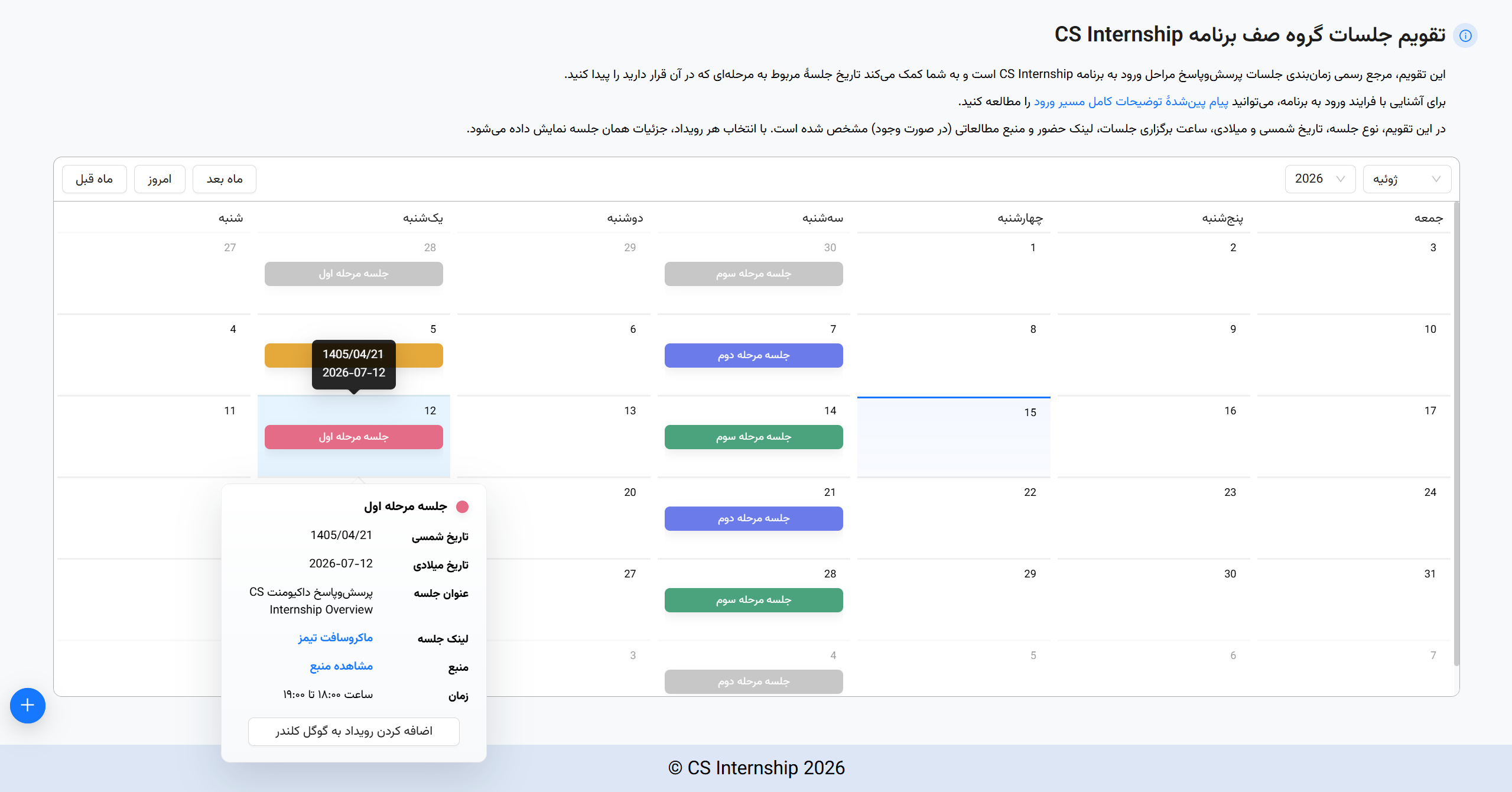
- Displays both Jalali and Gregorian dates for scheduled sessions
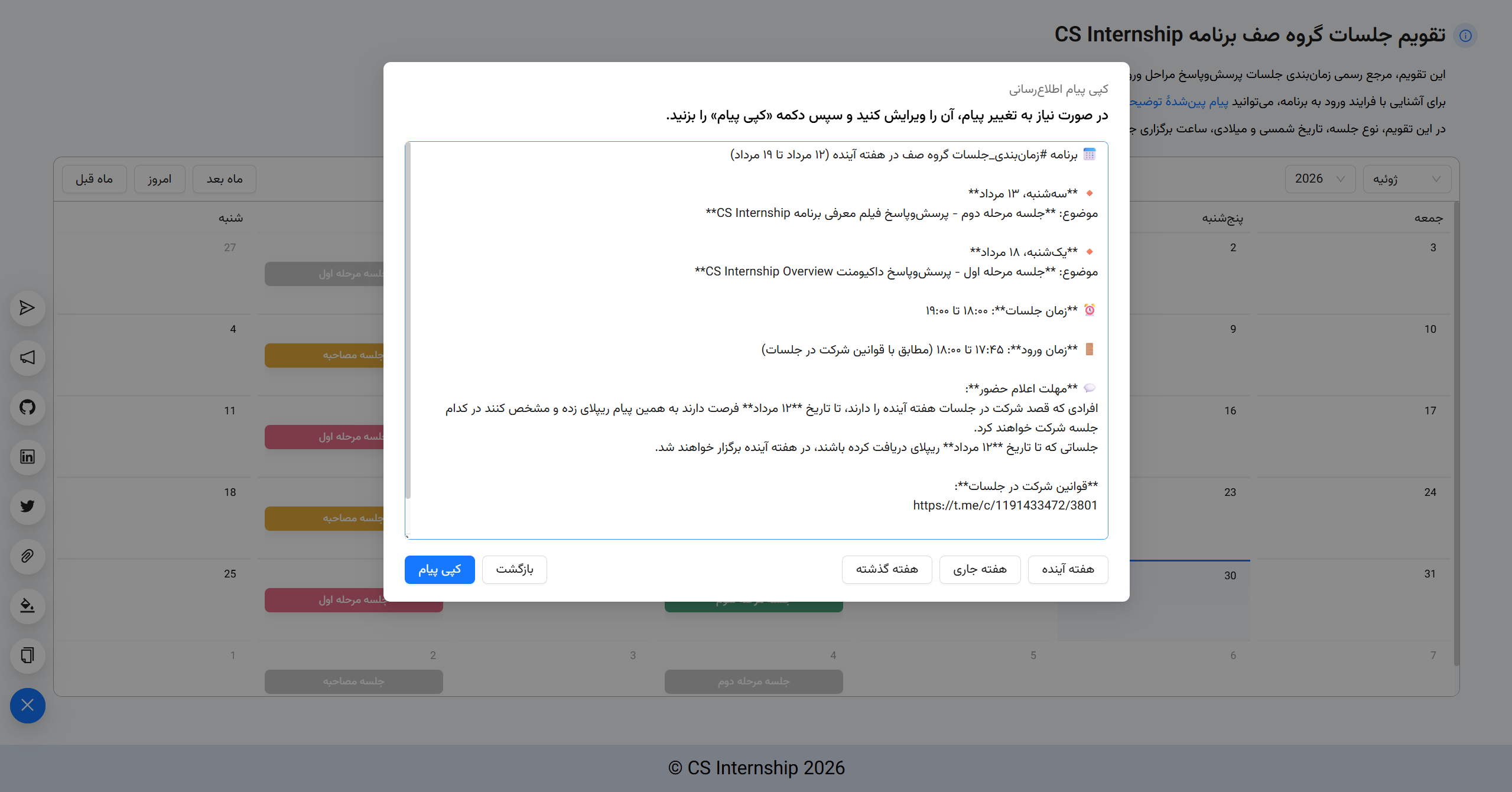
- Creates ready-to-share weekly announcements for queue admins
- Adds full event details to Google Calendar with one click
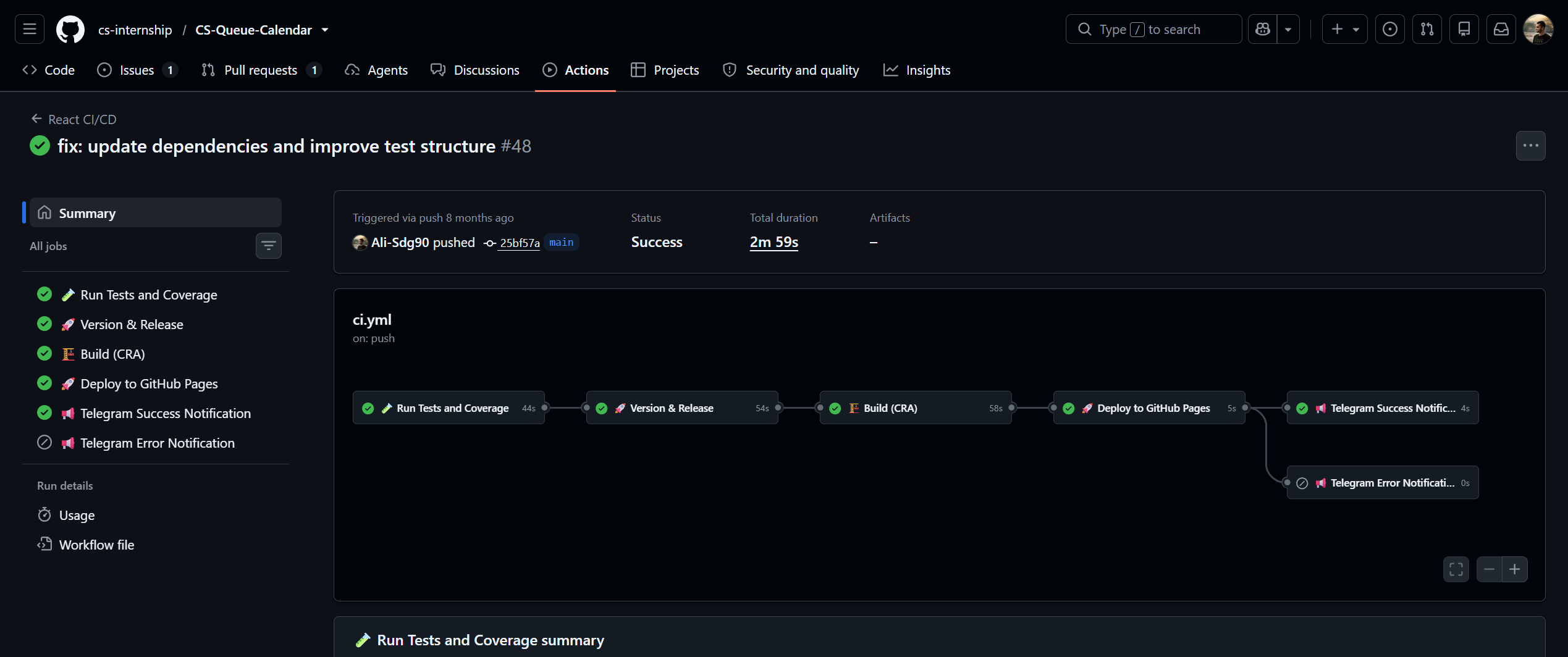
- Uses automated tests, coverage reports, releases, deployment, and Telegram build alerts
CS Queue Calendar story
Continue reading
At CS Internship, we'd been working on redesigning the program's admission process for several months. I'd spent months planning it, and together with the rest of the team, we'd put a lot of work into it. Now the new process was finally getting close to being launched.
In the new system, certain sessions would take place on fixed days and at fixed times every week. But there was a complication. The sessions changed every other week, and their order followed a specific pattern. So you couldn't simply say that these sessions would happen in the first week of the month and those sessions in the second.
Explaining this schedule was difficult, and for someone who was just trying to join the program, figuring out exactly which session would happen on which day could be pretty confusing.
I remember one of the mentors suggested having a long GitHub page listing which sessions would take place on which dates.
I really didn't like that idea.
I tried putting myself in the shoes of someone who had just gathered the courage to join a new program, decided to spend their time getting to know it, and was ready to start something new. And then the first thing they'd see when trying to understand the schedule would be an incredibly long list of dates and session names!
On top of that, the list would need to be constantly updated to keep the information about upcoming sessions accurate.
I didn't think it was a good solution at all.
So I suggested building a calendar. A simple web app where applicants could open the page and see which session would take place on each day and at what time.
Once the idea was approved, I started building it.
At the time, I was also working on a large project at Dadeh Pardazi Azmoudeh Karan using React and Ant Design, so I was already very comfortable working with both.
I went to the Ant Design website and noticed that the library had a really nice Calendar component. I loved it. This library has everything...
The component was pretty general-purpose, though, and wasn't designed for the Persian calendar. So I had to make quite a few changes to get it working the way our program needed.
One of the main challenges was using the Solar Hijri calendar inside a component that worked with the Gregorian calendar by default. I had to make sure the dates and sessions were displayed correctly in the Persian calendar without breaking the scheduling calculations.
The calendar also allowed users to move between different weeks and months. They could navigate forward and even see when the program's sessions would take place the following year.
It was important to me that the calendar wouldn't just show a list of upcoming sessions, but could display the program's schedule for whatever date someone wanted to check.
I think building the first version took around five or six days.
I'd built a clean, minimal, professional-looking calendar that displayed the session information.
From the beginning, I spent a lot of time on the small details, the smoothness of the animations, getting the styling right, and the overall appearance of the app. This page was going to be one of the first things new CS applicants interacted with, and I wanted them to have a good experience.
I'd even added a theme switcher with a custom animation. Like with my other projects, I wanted even the small details to feel polished and work properly.
Around that time, I'd just started learning about TDD, writing test cases, and Jest, so I decided to use them in this project.
I knew this calendar was going to be used by the program for a long time, and I wouldn't always be around to take care of it.
So I wrote a really thorough set of test cases for it. Maybe I even went a little too far with some of the details...
But I wanted anyone who worked on the project later to be able to make changes confidently, run the tests, and make sure nothing had broken.
I'd also recently learned about Husky, so I built an interesting system for handling commits.
Before allowing a commit, the system would first check the commit message using Semantic Release Preview, then run all the test cases. Only if everything was correct and all the tests passed would it allow the commit to go through! I thought that part was really cool.
I also set up a complete CI/CD system for the project. It would build and test the code, create a new version, and handle the release process. Once everything was done, it would announce the result in the program's mentors group through a Telegram bot.
A few months passed, and the program had been using the calendar during that time.
At CS, one of the program members was assigned to manage the waiting queue group each week. One of their tasks was to prepare a message introducing the following week's sessions and post it in the group so applicants would know what was coming up.
I thought, why not handle this part through the calendar too?
The calendar already knew exactly which session would take place on each date and what its meeting link was. So all the information and scheduling calculations needed to generate that message were already there.
I decided to add the feature myself.
I added a modal that automatically generated the message for the upcoming week's sessions, using the proper formatting and Markdown.
From then on, whoever was managing the waiting queue group only needed to open the web app, copy the generated message, and send it to the group.
They no longer had to manually prepare the dates, session order, meeting links, and message formatting every week.
Over time, this project became one of the program's most frequently used tools.
More than 160 people joined the waiting queue group during that period. Through the calendar, they could get familiar with the schedule and admission process, and join the designated sessions if they wanted to.
About a year later, I had a little more free time and decided to return to the project.
When I looked at the calendar again, I felt I could make the UI much better and more professional.
So I started redesigning different parts of it.
I added a section at the top explaining how to use the app. I improved the hover interactions and date display, changed how session details opened, and made the sessions themselves look more minimal.
I also added colored labels to make it easier to tell the different sessions apart.
I redesigned the mobile and tablet layouts too, making sure the app was fully responsive and looked clean and worked properly across different screen sizes.
In the same update, I added another feature I really liked: adding sessions to Google Calendar.
With just one click, users could add an event for their selected session to their own Google Calendar.
The event would have the exact date and time, and even include the full session description in its Description field. I really liked this integration.
It didn't take a huge amount of work to add, but it could make things much easier for applicants who wanted to attend the sessions. I'd build the feature once, and people could keep using it for years. Maybe that one feature would be enough to help someone remember a session and actually attend it.
I thought it was worth it.
During that same redesign, I also added a little something I really love: a hidden Easter egg!
A personal letter for anyone curious enough to explore and learn a little more about how the app was built.
I'm not going to say exactly where it is, but I personally really like that part. :)
Once the changes were finished, I introduced the new update and got some nice feedback from my friends who were using the calendar.
Some time later, I left CS Internship, but the calendar kept doing its job.
New applicants could still open it, check the session schedule, and use it to understand the steps involved in joining the program.
After I left, some of the links in the project needed to be updated.
When I saw that a few interns who had once been part of the web development track had gone into the project and made the necessary changes themselves, it made me feel really good.
My little creation didn't depend on me anymore. Other people could take care of it, and they wanted to.
That was exactly one of the things that had mattered to me from the very beginning: building a tool that could keep working after I left, and that other people could maintain and improve.
CS Queue Calendar was one of my favorite projects. It started from a real need within the program, gradually gained more features, and became one of CS's important tools.
A project I built with so much care, left a little piece of my soul in its heart, and now, even after I've left, it's still alive and helping new applicants.
What more could I ask for? :)
تو CS Internship چندین ماه درگیر بازطراحی فرایند ورود به برنامه بودیم. من ماهها برای این فرایند پلن چیده بودم و همراه بقیه اعضای تیم کلی کار براش انجام داده بودیم. حالا دیگه فرایند جدید داشت به مرحله اجرایی شدن میرسید.
تو مدل جدید قرار بود هر هفته یه سری جلسات مشخص، تو روزها و ساعتهای ثابت برگزار بشن. ولی یه پیچیدگی وجود داشت. جلسات یه هفته درمیون تغییر میکردن و ترتیب برگزاریشون هم خاص بود. یعنی نمیشد بهسادگی گفت هفته اول ماه این جلسات برگزار میشن و هفته دوم اون جلسات.
هم توضیح دادن این زمانبندی سخت بود، هم برای کسی که تازه میخواست وارد برنامه بشه، فهمیدن اینکه دقیقا چه روزی چه جلسهای برگزار میشه میتونست گیجکننده باشه.
یادمه یکی از منتورها پیشنهاد داد که یه صفحه طولانی تو GitHub داشته باشیم و توش بنویسیم چه تاریخی چه جلسهای برگزار میشه.
من اصلا این ایده رو خوب نمیدیدم.
خودم رو جای کسی میذاشتم که تازه شهامت این رو پیدا کرده که وارد یه برنامه جدید بشه، وقتش رو برای آشنا شدن باهاش بذاره و مسیر جدیدی رو شروع کنه. بعد اولین چیزی که برای فهمیدن زمان جلسات میبینه، یه لیست فوقالعاده طولانی از تاریخها و اسم جلسهها باشه!
تازه این لیست هم باید مدام آپدیت میشد تا اطلاعات جلسات آینده رو درست نشون بده.
به نظرم اصلا راهحل خوبی نبود.
برای همین ایده ساخت یه Calendar رو مطرح کردم. یه وباپ ساده که متقاضی بتونه بازش کنه و ببینه تو هر روز چه جلسهای، چه ساعتی برگزار میشه.
بعد از اینکه ایده تایید شد، رفتم سراغ ساختش.
اون زمان همزمان تو شرکت دادهپردازی آزمودهکاران داشتم با React و Ant Design یه پروژه بزرگ میساختم و حسابی دستم با این تکنولوژیها گرم بود.
رفتم سراغ سایت Ant Design و دیدم این کتابخونه یه کامپوننت Calendar خوشگل هم داره. خیلی ازش خوشم اومد. این کتابخونه همهچیز داره...
البته کامپوننتش خیلی جنرال بود و برای تقویم فارسی ساخته نشده بود. برای همین لازم بود دستی تغییرات زیادی توش بدم تا چیزی بشه که برای برنامه نیاز داشتیم.
یکی از پیچیدگیهای اصلی پروژه هم همین استفاده از تقویم شمسی تو کامپوننتی بود که بهصورت پیشفرض با تقویم میلادی کار میکرد. باید کاری میکردم که تاریخها و جلسات با تقویم شمسی درست نمایش داده بشن و محاسبات زمانبندی جلسات هم به مشکل نخورن.
تقویم امکان حرکت بین هفتهها و ماههای مختلف رو هم داشت. کاربر میتونست بره جلو و حتی ببینه سال بعد، جلسات برنامه تو چه تاریخهایی برگزار میشن.
این برام مهم بود که تقویم فقط یه لیست از جلسات نزدیک نباشه، بلکه بتونه زمانبندی برنامه رو برای هر تاریخی که کاربر میخواد نشون بده.
ساخت نسخه اولیه فکر میکنم حدود ۵ یا ۶ روز طول کشید.
یه صفحه تقویم تمیز، مینیمال و حرفهای ساخته بودم که اطلاعات جلسات رو به کاربر نشون میداد.
از همون اول روی ظرافت انیمیشنها، درست بودن استایلها و ظاهر کلی برنامه خیلی وقت گذاشتم. چون این صفحه قرار بود یکی از اولین چیزهایی باشه که متقاضیهای جدید ورود به CS باهاش کار میکنن و برام مهم بود که تجربه خوبی داشته باشن.
حتی قابلیت تغییر تم هم به برنامه اضافه کرده بودم که با یه انیمیشن کاستوم انجام میشد. مثل بقیه پروژههام، دوست داشتم جزئیات کوچیکش هم درست و باکیفیت باشن.
اون موقع تازه با TDD، تستکیسنویسی و Jest آشنا شده بودم و تصمیم گرفتم ازشون تو این پروژه استفاده کنم.
میدونستم این تقویم قراره برای مدت طولانی تو برنامه استفاده بشه و من هم قرار نیست همیشه حضور داشته باشم که مراقبش باشم.
برای همین براش تستکیسهای خیلی کامل و دقیقی نوشتم. شاید حتی تو بعضی قسمتها بیش از حد ریز شده بودم...
ولی دوست داشتم اگه بعدا کس دیگهای خواست روی پروژه کار کنه، بتونه با خیال راحت تغییراتش رو انجام بده، تستها رو اجرا کنه و مطمئن بشه چیزی خراب نشده.
تو همین زمان با Husky هم آشنا شده بودم و یه سیستم جالب برای کامیت کردن کدها ساختم.
سیستم قبل از ثبت کامیت، اول متن کامیت رو با Semantic Release Preview بررسی میکرد، بعد تمام تستکیسها رو اجرا میکرد و فقط اگه همهچیز درست بود و تستها پاس میشدن، اجازه میداد کامیت انجام بشه! این قسمتش خیلی برام باحال بود.
برای پروژه یه سیستم کامل CI/CD هم ساخته بودم که کدها رو Build و Test میکرد، ورژن جدید میزد و Release رو انجام میداد. در نهایت هم نتیجه فرایند رو از طریق یه بات تلگرام تو گروه منتورهای برنامه اعلام میکرد.
چند ماه از ساخت تقویم گذشت و تو این مدت برنامه داشت ازش استفاده میکرد.
تو CS هر هفته یکی از اعضای برنامه مسئول مدیریت گروه صف میشد. یکی از تسکهای این مسئول این بود که پیام معرفی جلسات هفته آینده رو آماده کنه و تو گروه بذاره تا متقاضیها بدونن چه جلساتی قراره برگزار بشن.
با خودم فکر کردم چرا این قسمت رو هم با همین تقویم انجام ندیم؟
تقویم از قبل دقیق میدونست تو چه تاریخی، چه جلسهای و با چه لینکی برگزار میشه. یعنی تمام اطلاعات و محاسباتی که برای ساخت اون پیام نیاز بود رو از قبل تو پروژه داشتم.
برای همین خودم رفتم سراغ اضافه کردن این قابلیت.
یه Modal به برنامه اضافه کردم که بر اساس تاریخ و جلسات هفته آینده، متن پیام مورد نیاز رو با فرمت و Markdown مناسب بهصورت خودکار میساخت.
از اون به بعد مسئول گروه صف فقط لازم بود وارد وباپ بشه، پیام آمادهشده رو کپی کنه و تو گروه بفرسته.
دیگه نیازی نبود هر هفته خودش تاریخها، ترتیب جلسات، لینکها و ساختار پیام رو دستی آماده کنه.
این پروژه بهمرور تبدیل به یکی از پراستفادهترین ابزارهای برنامه شد.
بیش از ۱۶۰ نفر تو اون مدت وارد گروه صف شدن و با استفاده از تقویم میتونستن با زمانبندی و مراحل ورود به برنامه آشنا بشن و اگه میخواستن، تو جلسات مشخصشده شرکت کنن.
حدود یه سال بعد، وقتم یکم سبکتر شده بود و تصمیم گرفتم دوباره برگردم سراغ پروژه.
وقتی ظاهر تقویم رو بررسی کردم، دیدم میتونم از نظر UI خیلی بهتر و حرفهایترش کنم.
برای همین شروع کردم به بازطراحی قسمتهای مختلفش.
بالای تقویم یه بخش برای توضیح نحوه کار کردن با برنامه اضافه کردم. رفتار Hover و نمایش تاریخ روزها رو بهتر کردم، باز شدن اطلاعات جلسات رو تغییر دادم و ظاهر خود جلسات رو مینیمالتر کردم.
برای اینکه تشخیص دادن جلسات مختلف راحتتر باشه، از لیبلهای رنگی هم استفاده کردم.
نمایش برنامه روی موبایل و تبلت رو هم دوباره طراحی کردم تا کاملا Responsive باشه و تو اندازههای مختلف صفحه درست و تمیز کار کنه.
تو همین آپدیت یه قابلیت خیلی باحال دیگه هم اضافه کردم: اضافه کردن جلسات به Google Calendar.
کاربر میتونست فقط با یه کلیک، برای جلسهای که انتخاب کرده بود یه Event تو Google Calendar خودش ثبت کنه.
تاریخ و ساعت جلسه دقیقا مشخص میشد و حتی تو قسمت Description ایونت هم توضیحات کامل اون جلسه قرار میگرفت. خیلی از این Integration خوشم اومد.
برای برنامه زحمت زیادی نداشت، ولی برای متقاضیای که میخواست تو جلسات شرکت کنه، میتونست خیلی کمککننده باشه. یه بار این قابلیت رو میساختم و بعد برای سالها افراد مختلف میتونستن ازش استفاده کنن. شاید همین یه قابلیت باعث میشد کسی جلسهش رو فراموش نکنه و بتونه توش حاضر بشه.
به نظرم ارزشش رو داشت.
تو همین مرحله یه چیز کوچیک دیگه هم به پروژه اضافه کردم که خیلی دوستش دارم: یه Easter Egg مخفی!
یه نامه شخصی برای کسی که کنجکاوه و دوست داره بیشتر درباره ساخت این برنامه بدونه.
نمیگم دقیقا کجاست، ولی خودم خیلی این قسمت رو دوست دارم. :)
بعد از تموم شدن تغییرات، آپدیت جدید برنامه رو معرفی کردم و از دوستهام که با تقویم کار میکردن بازخوردهای خوبی گرفتم.
مدتی بعد از CS Internship خارج شدم، ولی تقویم همچنان داشت کار خودش رو انجام میداد.
متقاضیهای جدید میتونستن واردش بشن، زمان جلسات رو ببینن و ازش برای آشنا شدن با مراحل ورود به برنامه استفاده کنن.
بعد از خروجم، یه سری اصلاحات مربوط به لینکهای برنامه لازم شده بود.
وقتی دیدم چند نفر از اینترنهایی که یه زمانی تو دوره وب بودن، خودشون رفتن سراغ پروژه و تغییرات لازم رو انجام دادن، خیلی حس خوبی گرفتم.
بچهم دیگه فقط محتاج من نبود. بقیه هم میتونستن و میخواستن ازش مراقبت کنن.
این دقیقا یکی از چیزهایی بود که از همون اول موقع ساخت پروژه برام مهم بود. اینکه یه ابزار بسازم که بعد از من هم بتونه به کارش ادامه بده و بقیه بتونن نگهش دارن و بهترش کنن.
CS Queue Calendar یکی از پروژههای دوستداشتنی من بود که از یه نیاز واقعی تو برنامه شروع شد، بهمرور قابلیتهای بیشتری گرفت و تبدیل به یکی از ابزارهای مهم CS شد.
پروژهای که با دقت زیادی ساختمش، یه تیکه از روحم رو تو قلبش گذاشتم و حالا حتی بعد از رفتن من هم همچنان زندهست و داره به متقاضیهای جدید کمک میکنه.
چی از این بیشتر میخوام؟ :)
Ask ChatGPT
Get a summary or ask questions about this page.