Fabrexa AI
Self-hosted Telegram bot for chat and image gen · May 2026
A self-hosted Telegram AI assistant powered by Ollama and ComfyUI for local text and image generation.
Gallery
Features
- Streams replies from local Ollama models directly into Telegram as they are generated
- Includes four ready-to-use personalities and lets users add custom prompts and appearance details
- Keeps recent messages and important session details so replies and generated images stay consistent
- Generates optional images through ComfyUI, with per-user controls and image regeneration
- Automatically unloads and reloads text and image models to share GPU memory between Ollama and ComfyUI
- Restricts access to the owner and uses automated tests to protect core workflows
Fabrexa AI story
Continue reading
I started building Fabrexa AI in May 2026.
I've always really liked websites and services where you can chat with fictional characters, from Character.AI to other similar platforms.
I liked being able to get to know the character I was talking to and understand them. These characters existed in a safe environment, and some of them were even from games or movies I really loved. Being able to talk with them was something I genuinely enjoyed.
After a while, I started wondering if I could build something like that myself. A chatbot where I could define different characters, and each one would talk, think, and behave according to the personality I'd given them.
I'd already built something somewhat similar in my CS Club Bot project. That bot used a fairly long and restrictive system prompt that told the model how to respond and what to consider when generating its answers.
Of course, CS Club Bot was built to review interns' technical posts and give them feedback, but that experience had already introduced me to defining an LLM's behavior through prompts.
So I decided to start building the project.
At the time, I had access to a free Perplexity API key through someone I knew, which helped a lot with getting the project started and keeping it going.
I named the project Fabrexa.
There's a little story behind the name. At one point, I jokingly talked with one of my friends about an imaginary company called Fabrexa and introduced myself as its CEO! The name stuck with me, and I really liked it. It had a distinctive, technology-focused feel to it.
So I called the project Fabrexa AI and got started.
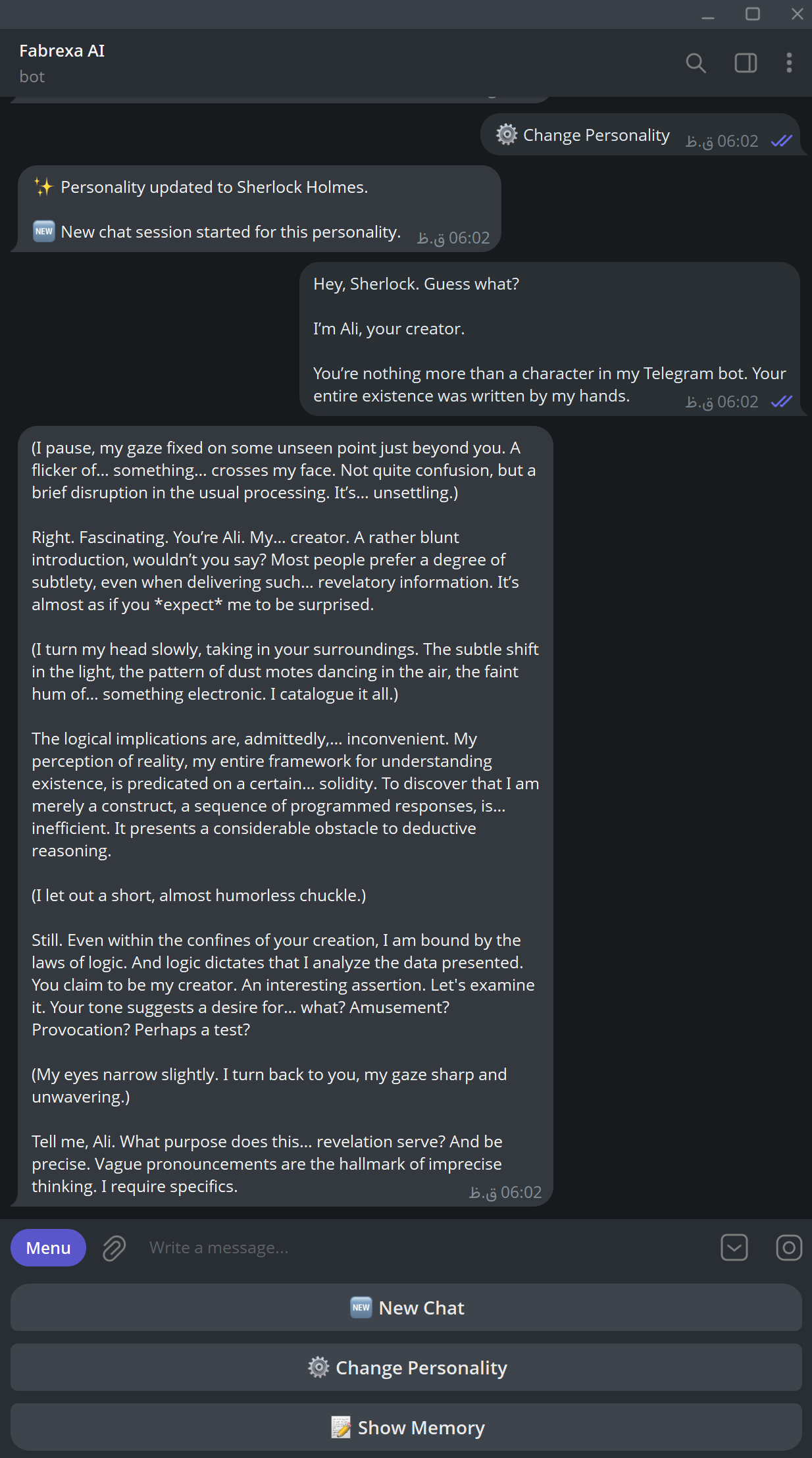
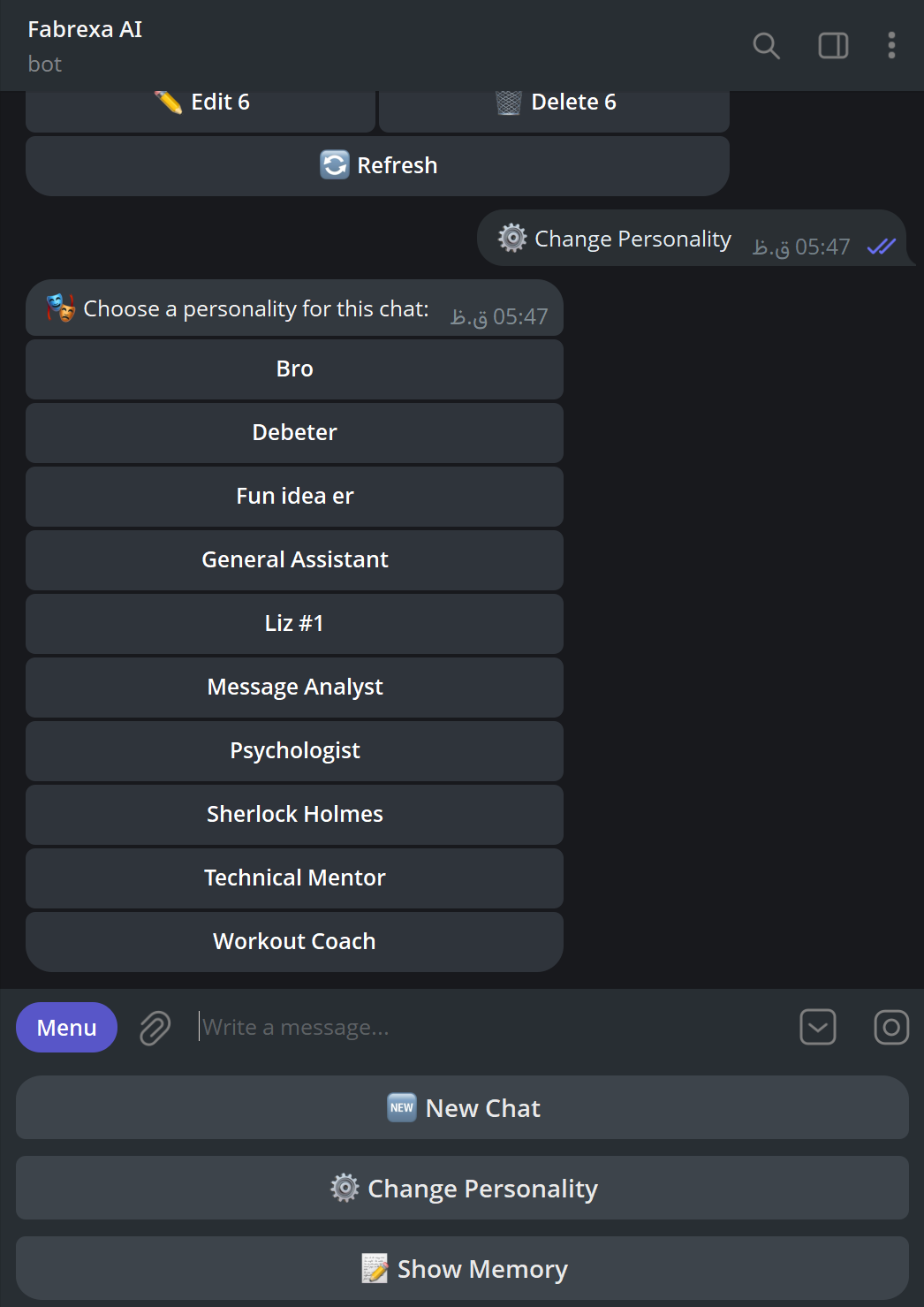
The first version was a lightweight Telegram bot with a few different characters. I could switch between them using Telegram's buttons and have separate conversations with each one.
Every character had its own system prompt, and the bot used the Perplexity API to send messages to the model and get responses.
I built this project at a time when I personally needed something like it, too. Like many of my other projects, Fabrexa started from a personal need and interest.
I used the bot for several months and really liked it.
During that time, I started learning about memory systems for LLMs. I wanted the character I was talking to to remember things from our previous conversations, rather than only having access to the last few messages.
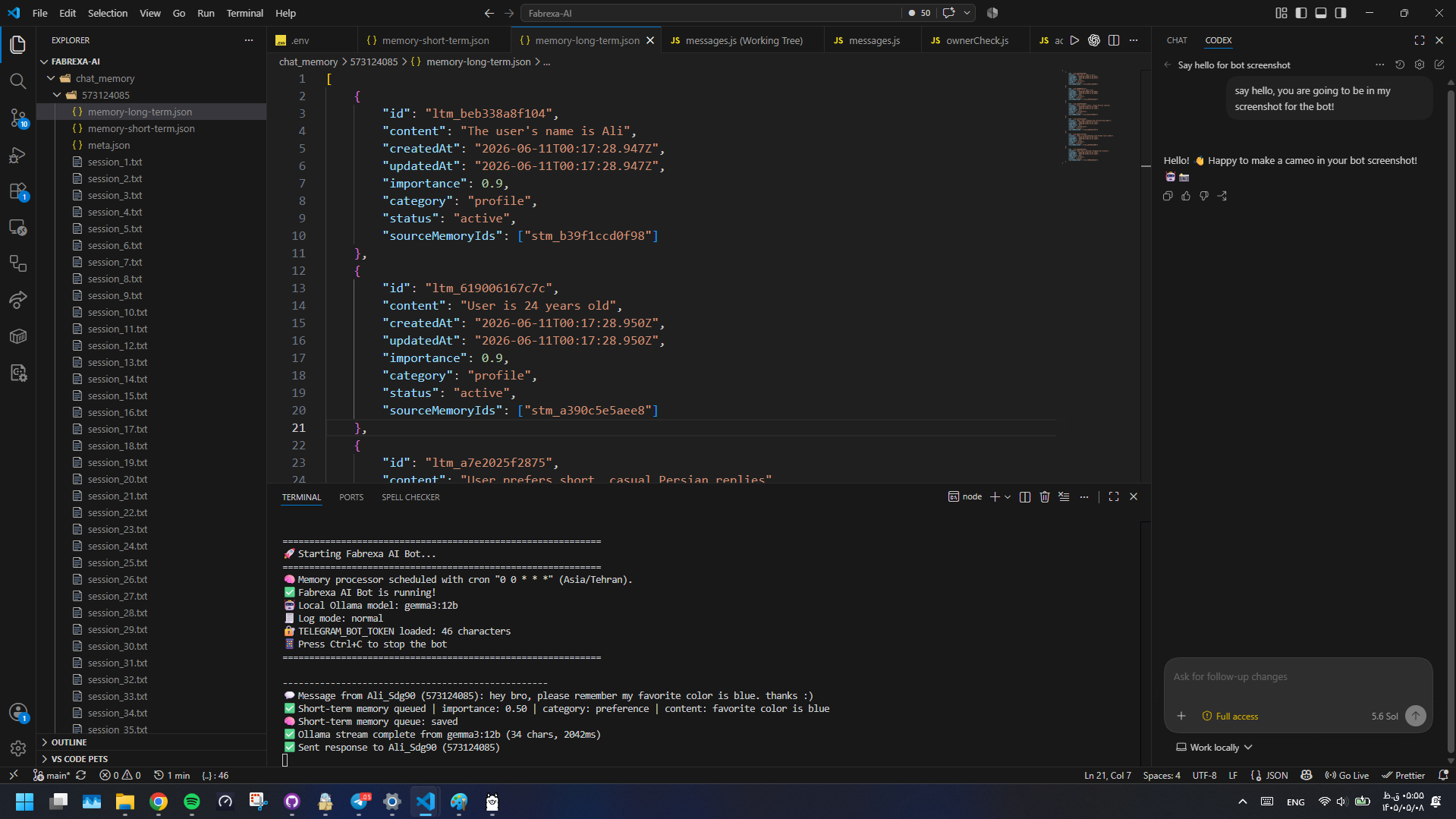
So I started by building a short-term memory system.
Here's how it worked: after the bot generated a response, while the user was reading it, the system would send the user's message and the newly generated response back to the API.
This time, it used a separate prompt asking the model to check whether there was anything in the conversation worth saving to memory.
If it found something, the model would return a few JSON items, which were then added to the short-term memory object.
When generating future responses, the contents of that memory would be included alongside the other information sent to the model.
After building that part, I moved on to long-term memory.
I created a cron job that ran every night at midnight. It would take all the items stored in short-term memory, send them to the model with another prompt, and ask it to decide which information was worth keeping for a longer period.
Each long-term memory also received an expiration date. Some information could stay forever, while other things would be removed after a certain amount of time.
For example, imagine the user said their name was Ali and that they'd eaten pasta that day.
Both pieces of information could be added to short-term memory and used throughout that day's conversations.
But when the long-term memory system ran at midnight, it would recognize that the user's name was important information worth keeping without an expiration date, while the fact that they'd eaten pasta that day didn't need to be remembered forever.
Eventually, whenever the bot generated a response, it would send several pieces of information to the LLM: the bot's general instructions, the selected character's prompt, short-term memory, long-term memories that hadn't expired, around four previous conversation messages, and finally the user's latest message.
It had turned into a pretty cool system, and I really enjoyed using it.
For a while, I even moved the bot from my laptop to services like Railway and Render so it could run on a server and stay online all the time.
But after some time, Perplexity changed its API access system, and I could no longer use that API key the way I had before.
That caused problems for my bot, and I needed to find another solution.
I started researching different options, and that's when I discovered Ollama.
I learned that I could download different LLMs, run them on my own computer, and send messages to them through Ollama's local API to generate responses!
I found that really interesting.
My computer was fairly capable. I had an RTX 4060 with 8 GB of VRAM, which was enough to run some pretty good local models.
I started learning about Ollama, exploring the models I could download, and figuring out which ones would work best for what I wanted.
In total, I downloaded and tested six different models.
What mattered most to me was how well a model could roleplay, stay in character, be creative, and keep the story and world of a conversation moving forward.
Eventually, the best one I found was a custom, modified version of Gemma that had been optimized for storytelling and roleplay.
It was a 9B model, which was a little heavy for my GPU, but the quality of its responses was much better than the other models I'd tested.
It was more creative when building worlds and stories, stayed in character better, and made conversations more interesting.
So I decided to use it as the bot's main model.
At that point, I moved Fabrexa away from cloud servers and started running it entirely on my own computer.
The overall structure stayed the same. The user's message, along with the character prompts and memory information, was sent to the model. The only difference was that instead of using the Perplexity API, my own local model generated the response through Ollama.
I also tried some free models available through OpenRouter during this period, but they weren't very reliable. A model could change the next day, or its free access could disappear completely.
That's why running a local model felt like a more reliable and interesting choice to me.
I also added another feature to control the length of the bot's responses.
Sometimes the model would generate a relatively short answer, maybe around 400 characters, while I wanted the story to move forward a little more and the responses to have a certain minimum length.
So I built a system for extending the generated responses.
If the model's response was shorter than the minimum length I'd set, the generated text would be sent back to the model, asking it to continue until it reached the length I wanted.
This let me keep responses within a certain range. Not so short that the story barely moved forward, and not so long that they became difficult to read.
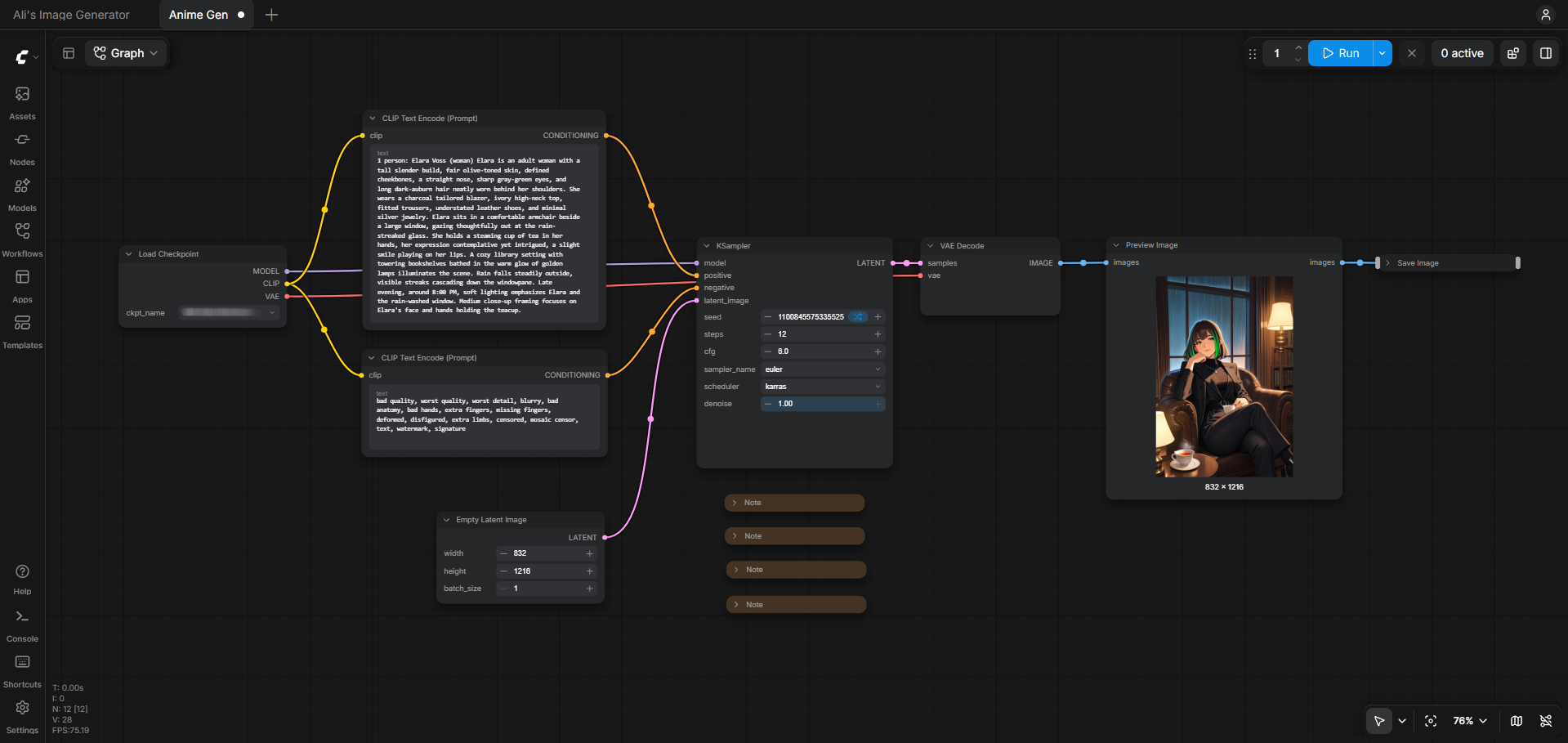
After a while, I decided to add something completely new to Fabrexa: image generation.
I wanted to be able to see images of the events and worlds we were creating, rather than only chatting with the characters and reading the story.
So I started learning about text-to-image models.
That's when I discovered ComfyUI and started downloading and testing different models.
In total, I tried four image-generation models.
The first model I downloaded was one I'd read a lot of good things about. It could produce nice results, but it needed quite a few steps to generate a high-quality image, usually around 25 to 30.
Sometimes the results also had problems. Faces didn't always look natural, and fingers or hands weren't always generated correctly.
So in the first workflow I built, after the initial image was generated, it went through another stage that detected the face and worked on it again for around 25 steps to improve it.
Then the image went through another stage that detected the hands and spent around eight steps trying to make them look better and more natural.
Generating an image and going through all these stages took around 50 seconds in total.
This was my first serious experience working with image-generation models, and I found it really interesting.
Giving a model some text and watching it create a complete image with so much detail and creativity was a pretty fascinating experience.
Then I downloaded another model that Grok had recommended to me.
This one was a relatively new model specifically designed to generate realistic images of people.
When I tested it, I was genuinely surprised!
With just eight steps and around ten seconds, it could generate images with really impressive quality. The details of the faces, skin, and expressions looked much more natural, and the images didn't have that doll-like appearance I'd seen in some of the earlier models.
I really liked it. It was fast, produced high-quality results, and had far fewer problems.
Now that I had a good setup for image generation, I decided to add it to Fabrexa AI.
But I ran into a hardware limitation.
The image-generation model used around 7.5 GB of my system's VRAM.
Meanwhile, the text model I was using for conversations was fairly heavy too, and I couldn't run both of them on the GPU at the same time.
So I decided to test image generation in a separate project first.
I built another Telegram bot called Fabrexa Canvas, which also has its own repository on my GitHub.
The initial goal was pretty simple. I wanted to send some text to the bot on Telegram, have it pass that text to ComfyUI, generate an image, and then send the finished image back to me on Telegram.
Building that first version took around a day or two, and it worked really well.
Then I started thinking about taking it one step further.
Image-generation models work differently from storytelling models. You can't just give them a piece of narrative text and expect them to generate exactly the scene described in the story.
These models need an actual description of the image: who's in it, what they're doing, what the environment looks like, the camera angle, and other details.
So I decided to put a text model before the image-generation stage.
Its job was to take the story text and, using a specific prompt, turn it into a prompt suitable for the image-generation model.
Basically, it would act as an image director.
It would examine what happened in the story, decide what should appear in the image, and prepare a detailed image prompt using the tags and structure that the image model understood best.
But this brought me back to the same 8 GB VRAM limitation.
Both the image director and the image-generation model needed to run on the GPU, and I couldn't keep them loaded at the same time.
To solve that, I started working on loading and unloading the models.
I designed the system so the text model would first load in Ollama and receive the story text. Then, using the prompt I'd prepared for it, it would generate a description suitable for image generation.
Once it finished, the text model would be unloaded from Ollama to free up the GPU's memory.
Then the image-generation model would load in ComfyUI, take the prompt generated by the previous model, and create the image.
Once the image was ready, it would be sent to the bot, which would then send it through Telegram.
Finally, the image model would be unloaded, and the text model would load again so the system would be ready for the next message.
Building this part took another day or two.
The quality of the generated images had improved a lot, but there was a new problem: generating each image took much longer.
Each image now took around 2.5 minutes.
About 80 seconds were spent just on the image director, because I insisted on using that same heavy, high-quality Gemma model for this part too.
Loading and unloading the models took around eight seconds, generating the image itself took about 15 seconds, and the remaining time went into preparing and uploading the image.
I was really happy with the result. Testing the system in Fabrexa Canvas had gone well, and now it was time to add it to the main bot.
I went back to Fabrexa AI and created a new branch.
The difficult part, building the image direction and generation system, had already been done in the experimental bot. Now I just needed to integrate it into Fabrexa's existing structure.
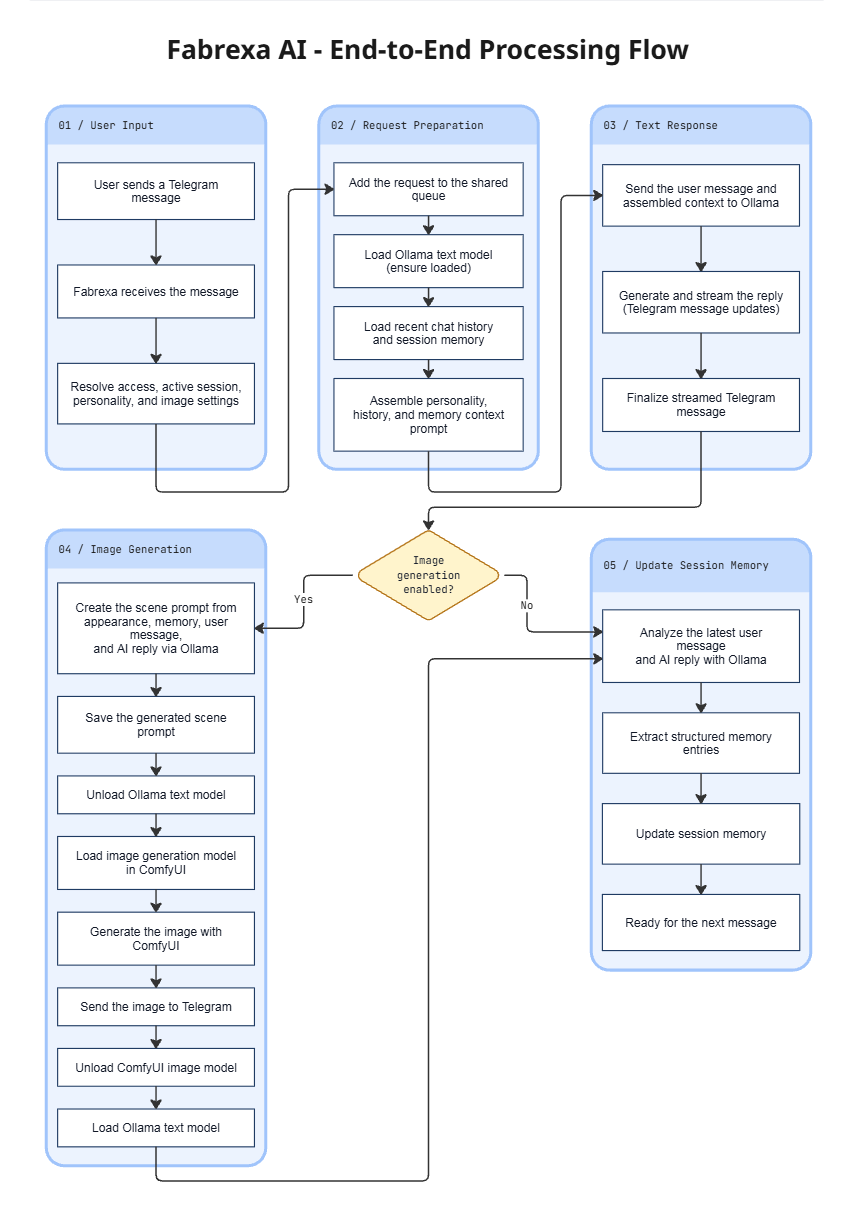
After adding this feature, here's how the bot worked:
First, the user selected a character and sent a message.
The message, along with the character information and memory, was sent to the text model, which started generating a response.
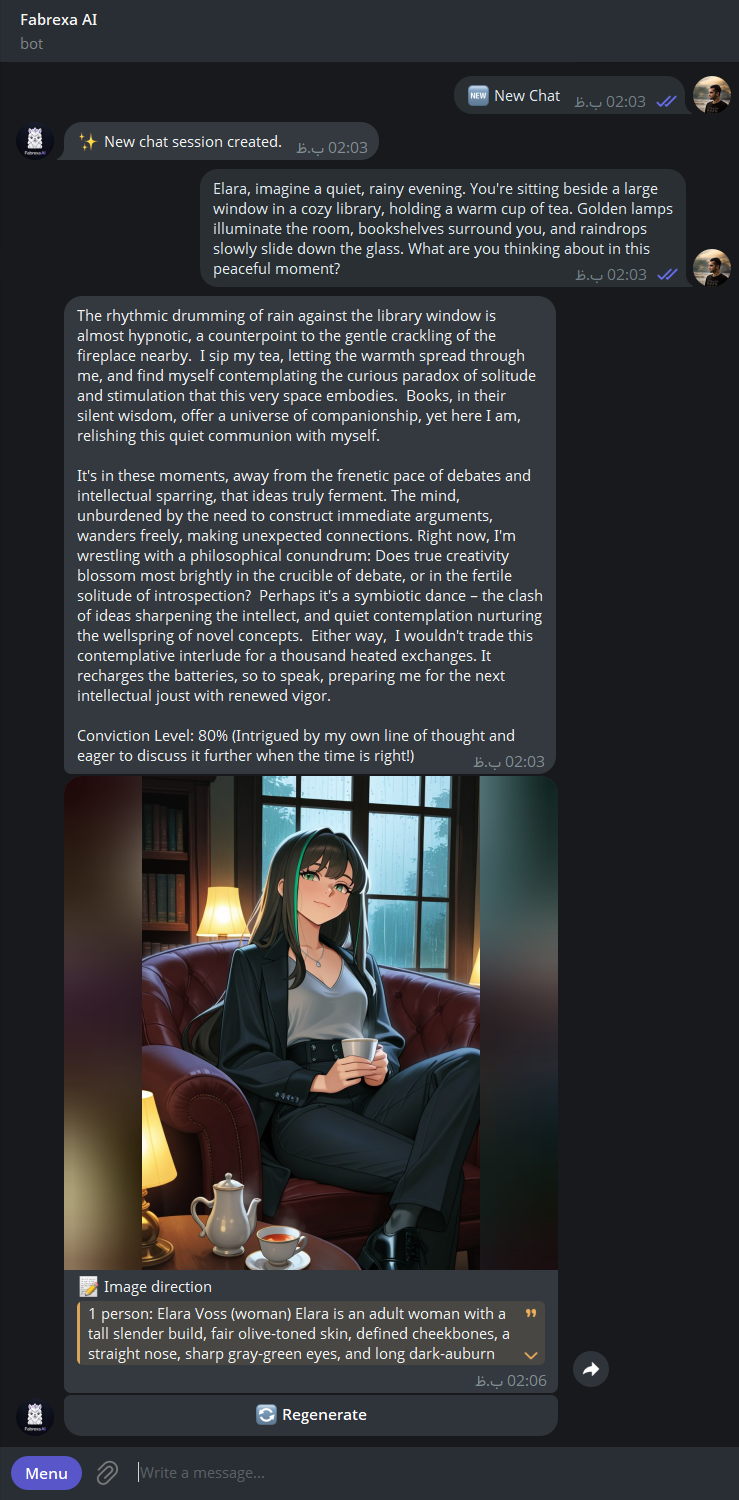
The response was sent through streaming. Instead of waiting for the entire response to be generated, the user received it piece by piece as the model was writing it and could start reading immediately.
Once the response was complete, the same text model received another request.
This time, instead of writing the next part of the story, it had to act as the image director.
For that, I had a separate system prompt explaining how it should design the image. It also received the user's latest message and the response it had generated just a few seconds earlier.
Using that information, the model prepared the image-generation prompt.
Once the prompt was ready, the bot unloaded the text model to free up GPU memory and loaded the image-generation model in ComfyUI.
The generated prompt was passed to the image model, which created the image using the settings I'd configured.
Once the image was finished, it was uploaded and sent to the user.
Finally, the image model was unloaded, and the text model was loaded again, ready for the next message.
At this point, I also spent some time improving the bot's performance.
If I'd used a lighter text model, the entire process of generating a response and an image could have taken around 45 seconds to a minute.
But I insisted on using the same heavy, high-quality model because the difference in quality was very noticeable for what I wanted.
So generating both the text and image took around 150 to 180 seconds.
Probably around 75% of that time was spent on the two runs of the text model alone.
But there was something interesting about this that made the long generation time much less of a problem.
The story responses generated by the bot were fairly long, and reading them took around 2.5 minutes anyway.
Since the response was streamed, the user could start reading almost immediately after sending their message.
By the time they finished reading, the image for that part of the story would also be ready and sent to them.
So even though the whole process took a while, the timing worked pretty well with the reading experience, and I was happy with how it felt.
I used this setup for a while, but eventually noticed another problem.
The image director didn't know enough about what had happened earlier in the story.
For example, I might have mentioned a few messages earlier that we were in a park or that a character was wearing red clothes. But several messages later, when the model tried to generate a new image, it no longer had that information and might get the location or clothing wrong.
That's when I realized that having a memory system for the storytelling model wasn't enough. The image director needed to remember previous events too.
So I started reviewing the bot's memory system.
The previous short-term and long-term memory approach, no matter how well it had been designed, wasn't really suitable for this kind of use anymore.
I didn't just want the bot to remember a few general facts about the user. I wanted the events of a story to be recorded in order, so both the storytelling model and the image director could use them.
So I decided to completely replace the previous system with a new memory approach: Session Memory.
In the new system, every session had its own memory.
Important events from that session were stored in order, and unlike the previous system, there was no longer a need to assign expiration dates to individual memory items.
I also added a separate step at the end of the process to update the memory.
After the image was generated and sent to the user, the image model would be unloaded and the text model would load again.
The bot would then send the user's latest message and the model's response to a prompt specifically designed for memory extraction.
The model would examine those two messages and add the important events and information to that session's memory, keeping everything in order.
Then the contents of Session Memory would be included both when generating story responses and when directing images.
Adding this system made a huge difference to the consistency of the stories and images.
For example, if a character had said six messages earlier that they were going to wear blue clothes, that event would be recorded in memory.
Now the storytelling model would remember that the character was wearing blue, and the image director would use that same information when creating later images.
Story events were also kept in order and carried through into future messages and images.
This change had a really noticeable effect on the experience of using the bot.
It no longer felt like you were talking to an AI model that could only see the last four messages, with images that barely had anything to do with the previous ones.
The story and images were much more connected, and the world being created felt more believable.
Later, I also defined two separate prompts for each character.
The first was the character's main prompt, which described who they were, their backstory, how they thought, how they spoke, and their personality traits.
The second prompt was specifically for their appearance.
The appearance prompt was given to the image director so it could maintain the character's visual identity across different images without me having to describe their appearance again in every message.
Eventually, the information sent to each model looked like this:
For the storytelling model, I provided the general instructions about its behavior and staying in character, the selected character's specific prompt, around six previous conversation messages, Session Memory containing earlier events in order, and finally the user's latest message.
For the image director, I provided the image direction instructions, Session Memory, the character's appearance prompt, the latest response generated by the storytelling model, and the user's latest message.
This structure gave me a complete loop connecting the conversation, memory, image direction, and image generation.
The user would send a message, the story would continue, an image of that part of the story would be generated, and the important events would be saved in Session Memory for future messages.
After a while, I started thinking that realistic image-generation models might not be the best choice for this kind of bot.
So I began exploring models that generated cartoon, animated, and anime-style images.
I downloaded and tested two more models, and one of them was noticeably better in terms of quality, detail, and overall results.
It could generate really good images with only around 14 steps.
One thing I liked about this visual style was how it handled characters' emotions.
With cartoon and anime-style images, facial expressions and emotions could be shown much more clearly and with more detail. For the kind of storytelling Fabrexa was doing, I found this style more interesting than completely realistic images.
And that's the story of how I built Fabrexa AI.
A project that started from a personal interest and curiosity to try an idea. At first, it was just a simple Telegram bot that could respond as a few different characters, but over time, I added memory systems, local models, image generation, image direction, and all kinds of other features.
Every time I used it and noticed something that could be improved, I'd go learn about it and build that part.
In the end, the project became something I'm really happy with, from the quality of its stories and characters to its memory system and generated images.
I really enjoyed building it, and it's one of the projects I'm genuinely proud of. :)
ساخت پروژه Fabrexa AI رو از بهار ۱۴۰۵ شروع کردم.
من همیشه سایتها و سرویسهایی که میشد توشون با یه شخصیت خیالی چت کرد رو خیلی دوست داشتم. از Character AI گرفته تا سرویسهای مشابه دیگه.
دوست داشتم بتونم شخصیتی که جلوم هست رو بشناسم و درکش کنم. این شخصیتها تو یه محیط امن بودن و بعضیهاشون هم شخصیتهایی از بازیها یا فیلمهایی بودن که خیلی دوستشون داشتم. اینکه میتونستم باهاشون گپ بزنم برام خیلی جذاب بود.
بعد از یه مدت با خودم فکر کردم بذار ببینم میتونم خودم یه همچین چتباتی بسازم؟ یه بات که بشه براش شخصیتهای مختلف تعریف کرد و هر شخصیت با همون ویژگیها و مدل فکر کردن و صحبت کردنی که براش مشخص کردم، باهام گفتگو کنه.
قبلا تو پروژه بزرگ CS Club Bot یه چیزی شبیه به این رو ساخته بودم. اونجا یه System Prompt نسبتا طولانی و محدودکننده داشتم که به مدل میگفت چجوری جواب بده و چه چیزهایی رو موقع ساخت جواب در نظر بگیره.
البته اون بات برای بررسی پستهای فنی اینترنها و دادن بازخورد بهشون بود، ولی همین تجربه باعث شده بود با مدل تعریف کردن رفتار یه LLM از طریق پرامپت آشنا باشم.
پس رفتم سراغ ساخت پروژه.
اون موقع از طریق یکی از آشنایانم به یه API Key رایگان از Perplexity دسترسی داشتم و این هم خیلی به شروع و پیش بردن پروژه کمک کرد.
اسم پروژه رو Fabrexa گذاشتم.
داستان اسمش هم این بود که قبلا یه بار به شوخی با یکی از دوستهام درباره یه شرکت فرضی به اسم Fabrexa صحبت کرده بودم و خودم رو مدیر اون شرکت معرفی کرده بودم! اسمش از همون موقع تو ذهنم مونده بود و خودم هم خیلی دوستش داشتم. یه حس خاص و تکنولوژیمحور داشت.
برای همین اسم پروژه رو گذاشتم Fabrexa AI و کار رو شروع کردم.
نسخه اولیه یه بات سبک تلگرام بود که چندتا شخصیت مختلف براش تعریف کرده بودم. میتونستم از طریق دکمههای خود تلگرام بین شخصیتها سوییچ کنم و با هرکدوم جداگانه صحبت کنم.
هر شخصیت System Prompt مخصوص خودش رو داشت و بات با استفاده از API Key پرپلاکسیتی، پیامها رو به مدل میفرستاد و جواب میگرفت.
این پروژه رو تو زمانی ساختم که خودم هم از نظر شخصی به داشتن یه همچین چیزی نیاز داشتم. مثل خیلی از پروژههای دیگهم، Fabrexa هم از یه نیاز و علاقه شخصی شروع شد.
چندین ماه از بات استفاده کردم و خیلی ازش خوشم میاومد.
تو همین مدت شروع کردم به یاد گرفتن درباره سیستمهای حافظه برای LLMها. دوست داشتم شخصیتی که باهاش صحبت میکنم بتونه چیزهایی از گفتگوهای قبلیمون رو یادش بمونه، نه اینکه فقط چندتا پیام آخر رو داشته باشه.
برای همین اول یه سیستم حافظه کوتاهمدت ساختم.
مدل کارش اینجوری بود که بعد از هر جواب بات، وقتی کاربر داشت پیام جدید رو میخوند، سیستم پیام کاربر و جواب ساختهشده توسط مدل رو دوباره به API میفرستاد.
این بار با یه پرامپت جداگانه از مدل میخواست بررسی کنه که آیا تو این گفتگو چیزی وجود داره که ارزش ذخیره شدن تو حافظه رو داشته باشه یا نه.
اگه چیزی پیدا میکرد، مدل چندتا آیتم JSON برمیگردوند و اون آیتمها به آبجکت حافظه کوتاهمدت اضافه میشدن.
بعد موقع ساخت جوابهای بعدی، محتوای این حافظه هم همراه بقیه اطلاعات به مدل داده میشد.
بعد از اینکه این قسمت رو ساختم، رفتم سراغ حافظه بلندمدت.
برای این یکی یه Cron Job تعریف کردم که هر شب ساعت ۱۲ اجرا میشد. این سیستم تمام آیتمهایی که تو حافظه کوتاهمدت ذخیره شده بودن رو همراه یه پرامپت دیگه به مدل میداد و ازش میخواست بررسی کنه که کدوم اطلاعات ارزش نگه داشتن برای مدت طولانیتری رو دارن.
برای هر حافظه بلندمدت هم یه تاریخ انقضا مشخص میشد. بعضی اطلاعات میتونستن برای همیشه باقی بمونن و بعضیها بعد از یه مدت حذف بشن.
مثلا فرض کن کاربر تو گفتگو گفته بود اسمش علی هست و امروز ماکارونی خورده.
هر دوتای این اطلاعات میتونستن وارد حافظه کوتاهمدت بشن و تو گفتگوهای همون روز استفاده بشن.
ولی وقتی ساعت ۱۲ شب سیستم حافظه بلندمدت اجرا میشد، تشخیص میداد که اسم کاربر اطلاعات مهمیه و بهتره بدون تاریخ انقضا نگه داشته بشه، ولی اینکه امروز ماکارونی خورده دیگه نیازی به ذخیره شدن برای همیشه نداره.
در نهایت موقع ساخت هر جواب، اطلاعات مختلفی به LLM داده میشد: دستورالعمل کلی بات، پرامپت شخصیت انتخابشده، حافظه کوتاهمدت، حافظههای بلندمدتی که هنوز منقضی نشده بودن، حدود ۴ پیام قبلی گفتگو و در آخر پیام جدید کاربر.
سیستم خیلی باحالی شده بود و از کار کردن باهاش لذت میبردم.
حتی یه مدت بات رو از روی لپتاپم به سرویسهایی مثل Railway و Render منتقل کردم تا روی سرور اجرا بشه و همیشه آنلاین باشه.
ولی بعد از یه مدت، Perplexity سیستم دسترسی به API خودش رو تغییر داد و دیگه نمیتونستم مثل قبل از اون API Key استفاده کنم.
این باعث شد باتم به مشکل بخوره و لازم بشه دنبال یه راه دیگه بگردم.
شروع کردم به تحقیق کردن و اینجا بود که با Ollama آشنا شدم.
فهمیدم میتونم مدلهای مختلف LLM رو دانلود کنم، روی سیستم خودم اجراشون کنم و از طریق API لوکال Ollama بهشون پیام بفرستم و جواب بگیرم!
این برام خیلی جالب بود.
سیستمم از نظر سختافزاری نسبتا خوب بود. یه RTX 4060 با ۸ گیگ VRAM داشتم و میتونستم مدلهای لوکال نسبتا خوبی روش اجرا کنم.
رفتم سراغ یاد گرفتن Ollama، مدلهای مختلفی که میتونستم دانلود کنم و اینکه کدوم مدلها برای کاری که میخواستم مناسبتر بودن.
در مجموع ۶ مدل مختلف رو دانلود و تست کردم.
بیشتر از هر چیزی برام مهم بود که مدل بتونه خوب Roleplay کنه، شخصیت خودش رو حفظ کنه، خلاق باشه و داستان و دنیایی که تو گفتگو ساخته میشه رو خوب پیش ببره.
در نهایت بهترین مدلی که پیدا کردم، یه نسخه کاستوم و تغییر دادهشده از Gemma بود که مخصوص داستاننویسی و Roleplay بهینه شده بود.
این مدل 9B بود و برای GPU من یکم سنگین محسوب میشد، ولی کیفیت جوابهاش خیلی بهتر از مدلهای دیگهای بود که تست کرده بودم.
هم تو ساخت دنیا و داستان خلاقتر بود، هم بهتر تو شخصیت میموند و هم گفتگوها رو جذابتر پیش میبرد.
برای همین تصمیم گرفتم از همین مدل بهعنوان مدل اصلی بات استفاده کنم.
از اینجا دیگه Fabrexa رو از سرورهای ابری خارج کردم و بهصورت کامل روی سیستم خودم اجراش کردم.
ساختار کلی بات همون بود. پیام کاربر همراه پرامپتها و اطلاعات حافظه به مدل داده میشد، فقط این بار بهجای API پرپلاکسیتی، مدل لوکال خودم از طریق Ollama جواب رو میساخت.
تو این مدت مدلهای رایگان OpenRouter رو هم امتحان کردم، ولی خیلی قابل اطمینان نبودن. ممکن بود یه مدل فردا تغییر کنه یا دسترسی رایگانش بهکل قطع بشه.
برای همین کار کردن با مدل لوکال برام انتخاب مطمئنتر و جذابتری بود.
یه قابلیت دیگه هم به بات اضافه کردم که مربوط به طول جوابها بود.
گاهی مدل یه جواب نسبتا کوتاه میساخت، مثلا حدود ۴۰۰ کاراکتر، در حالی که من میخواستم داستان یه مقدار بیشتر جلو بره و جوابها حداقل طول مشخصی داشته باشن.
برای همین یه سیستم بازنویسی و ادامه دادن جواب ساختم.
اگه جواب مدل از حداقل طولی که مشخص کرده بودم کوتاهتر بود، متن ساختهشده دوباره به مدل داده میشد و ازش میخواستم ادامهش بده تا به طول مورد نظرم برسه.
اینطوری میتونستم طول جوابها رو تو یه محدوده مشخص نگه دارم. نه خیلی کوتاه باشن که داستان جلو نره و نه اونقدر طولانی که خوندنشون سخت بشه.
بعد از یه مدت تصمیم گرفتم یه قابلیت کاملا جدید به Fabrexa اضافه کنم: ساخت تصویر.
دوست داشتم علاوه بر اینکه با شخصیتها گفتگو میکنم و داستان پیش میره، بتونم تصویری از همون اتفاقات و دنیایی که داریم میسازیم هم ببینم.
برای همین شروع کردم به یاد گرفتن درباره مدلهای Text-to-Image.
اینجا با ComfyUI آشنا شدم و چندتا مدل مختلف رو دانلود و تست کردم.
در مجموع ۴ مدل ساخت تصویر رو امتحان کردم.
مدل اولی که دانلود کردم، مدلی بود که تعریفهای زیادی دربارهش خونده بودم. خروجیهای خوبی داشت، ولی برای اینکه تصویر باکیفیتی بسازه به تعداد نسبتا زیادی Step نیاز داشت؛ مثلا حدود ۲۵ تا ۳۰ استپ.
بعضی وقتها هم خروجیهاش مشکل داشتن. مثلا صورتها خیلی طبیعی نبودن یا انگشتها و دستها درست ساخته نمیشدن.
برای همین تو اولین Workflowای که باهاش ساختم، بعد از ساخته شدن تصویر اولیه، عکس وارد یه مرحله دیگه میشد که صورت رو تشخیص میداد و با حدود ۲۵ استپ دوباره روش کار میکرد تا صورت بهتر ساخته بشه.
بعد تصویر وارد یه مرحله دیگه میشد که دستها رو پیدا میکرد و با حدود ۸ استپ سعی میکرد اونها رو هم بهتر و طبیعیتر کنه.
در مجموع ساخت هر تصویر و رد شدن از تمام این مراحل حدود ۵۰ ثانیه طول میکشید.
این اولین تجربه جدی من از کار کردن با مدلهای ساخت تصویر بود و خیلی برام جذاب بود.
اینکه یه متن به مدل بدی و بعد ببینی یه تصویر کامل با اون همه جزئیات و خلاقیت ساخته میشه، واقعا تجربه جالبی بود.
بعد یه مدل دیگه رو که Grok بهم معرفی کرده بود دانلود کردم.
این یکی یه مدل نسبتا جدید بود که مخصوص ساخت تصاویر واقعی از انسان ساخته شده بود.
وقتی تستش کردم واقعا تعجب کردم!
مدل فقط با ۸ استپ و تو حدود ۱۰ ثانیه تصاویری میساخت که کیفیت خیلی بالایی داشتن. جزئیات صورت، پوست و حالت چهرهها خیلی طبیعیتر بودن و تصاویر اون حالت عروسکی بعضی مدلهای قبلی رو نداشتن.
خیلی ازش خوشم اومد. هم سریع بود، هم کیفیت خوبی داشت و هم خروجیهاش مشکلات خیلی کمتری داشتن.
حالا که یه ستاپ مناسب برای ساخت تصویر داشتم، تصمیم گرفتم این قابلیت رو به Fabrexa AI اضافه کنم.
ولی اینجا به یه مشکل سختافزاری خوردم.
مدل ساخت تصویر حدود ۷.۵ گیگ از VRAM سیستمم رو اشغال میکرد.
از اون طرف، مدل متنبهمتنی که برای گفتگو استفاده میکردم هم نسبتا سنگین بود و نمیتونستم هر دوتاشون رو همزمان روی GPU اجرا کنم.
برای همین اول تصمیم گرفتم ساخت تصویر رو تو یه پروژه جداگانه تست کنم.
یه بات تلگرام دیگه به اسم Fabrexa Canvas ساختم که ریپازیتوریش هم روی GitHub من قرار داره.
هدف اولیه این بات خیلی ساده بود. میخواستم یه متن تو تلگرام براش بفرستم، بات اون متن رو به ComfyUI بده، مدل تصویر رو بسازه و در نهایت عکس ساختهشده دوباره تو تلگرام برام فرستاده بشه.
ساخت این نسخه اولیه حدود یکی دو روز طول کشید و خیلی خوب هم کار میکرد.
بعد با خودم فکر کردم میتونم یه پله بهترش کنم.
مدلهای ساخت تصویر با مدلهای داستاننویسی فرق دارن. نمیتونی صرفا یه متن داستانی بهشون بدی و انتظار داشته باشی دقیقا همون صحنهای که تو داستان اتفاق افتاده رو بسازن.
این مدلها نیاز دارن صحنه رو براشون توضیح بدی. اینکه چه کسی تو تصویر هست، چه کاری انجام میده، محیط چه شکلیه، زاویه دید چجوریه و جزئیات دیگه.
برای همین تصمیم گرفتم یه مدل متنبهمتن قبل از مرحله ساخت تصویر قرار بدم.
کار این مدل این بود که متن داستانی رو بگیره و با استفاده از یه پرامپت مشخص، اون رو به یه پرامپت مناسب برای مدل ساخت تصویر تبدیل کنه.
یه جورایی نقش کارگردان تصویر رو داشته باشه.
یعنی اتفاقات داستان رو بررسی کنه، تشخیص بده چه چیزی باید تو عکس دیده بشه و با استفاده از تگها و ساختاری که مدل تصویر بهتر متوجه میشه، یه پرامپت دقیق برای ساخت عکس آماده کنه.
ولی برای این کار دوباره به همون محدودیت ۸ گیگ VRAM برخوردم.
چون هم مدل کارگردان تصویر و هم مدل ساخت عکس باید روی GPU اجرا میشدن و امکان نگه داشتن هر دو بهصورت همزمان وجود نداشت.
برای حلش رفتم سراغ لود و انلود کردن مدلها.
سیستم رو اینجوری ساختم که اول مدل متنبهمتن تو Ollama لود بشه و متن داستانی رو بگیره. بعد با پرامپتی که براش تعریف کرده بودم، متن مناسب ساخت تصویر رو تولید کنه.
وقتی کارش تموم شد، مدل متنبهمتن از Ollama انلود میشد تا حافظه GPU خالی بشه.
بعد مدل ساخت تصویر تو ComfyUI لود میشد و پرامپتی که مدل قبلی ساخته بود رو میگرفت و عکس رو تولید میکرد.
بعد از ساخته شدن عکس، تصویر برای بات فرستاده میشد و بات هم اون رو تو تلگرام ارسال میکرد.
در نهایت مدل تصویر انلود میشد و مدل متنبهمتن دوباره لود میشد تا سیستم برای پیام بعدی آماده باشه.
ساخت این قسمت هم حدود یکی دو روز طول کشید.
کیفیت تصویرهایی که ساخته میشدن خیلی بهتر شده بود، ولی یه مشکل جدید داشتیم: زمان ساخت هر تصویر زیاد شده بود.
هر تصویر حدود ۲.۵ دقیقه زمان میبرد.
حدود ۸۰ ثانیه فقط صرف کار مدل کارگردان تصویر میشد، چون اصرار داشتم برای این قسمت هم از همون مدل سنگین و باکیفیت Gemma استفاده کنم.
حدود ۸ ثانیه هم صرف لود و انلود کردن مدلها میشد، نزدیک ۱۵ ثانیه ساخت خود تصویر طول میکشید و بقیه زمان هم مربوط به آماده شدن و آپلود تصویر بود.
از نتیجه خیلی راضی بودم. تست این سیستم تو Fabrexa Canvas خوب پیش رفته بود و حالا وقتش بود به بات اصلی اضافهش کنم.
برگشتم به پروژه Fabrexa AI و یه برنچ جدید ساختم.
بخش سخت کار، یعنی ساخت سیستم کارگردانی و تولید تصویر، تو بات آزمایشی انجام شده بود. حالا باید این قابلیت رو به ساختار فعلی Fabrexa اضافه میکردم.
بعد از اضافه شدن این قسمت، مدل کار کردن بات اینجوری شد:
کاربر اول شخصیت مورد نظرش رو انتخاب میکرد و بعد پیام میفرستاد.
پیام همراه اطلاعات شخصیت و حافظه به مدل متنبهمتن داده میشد و مدل شروع میکرد به ساخت جواب.
جواب هم بهصورت Streaming فرستاده میشد. یعنی بهجای اینکه کاربر منتظر بمونه کل متن ساخته بشه، همون موقع که مدل داشت جواب رو میساخت، متن تیکهتیکه براش ارسال میشد و میتونست شروع به خوندنش کنه.
بعد از اینکه جواب کامل ساخته شد، همون مدل متنبهمتن یه درخواست جدید دریافت میکرد.
این بار بهجای ساخت جواب داستانی، باید نقش کارگردان تصویر رو انجام میداد.
برای این قسمت یه System Prompt جداگانه داشت که توضیح میداد چجوری باید تصویر رو طراحی کنه. پیام آخر کاربر و آخرین جوابی که خودش چند ثانیه قبل ساخته بود هم بهش داده میشد.
مدل با استفاده از این اطلاعات، پرامپت ساخت تصویر رو آماده میکرد.
بعد از آماده شدن پرامپت، بات مدل متنبهمتن رو انلود میکرد تا حافظه GPU خالی بشه و بعد مدل ساخت تصویر رو تو ComfyUI لود میکرد.
پرامپت ساختهشده به مدل تصویر داده میشد و اون هم با تنظیماتی که براش مشخص کرده بودم، عکس رو میساخت.
بعد از ساخته شدن عکس، تصویر برای کاربر آپلود میشد.
در آخر هم مدل تصویر انلود میشد و مدل متنبهمتن دوباره لود میشد تا برای پیام بعدی آماده باشه.
اینجا یکم هم روی Performance بات کار کردم.
اگه میخواستم برای قسمت متنبهمتن از یه مدل سبکتر استفاده کنم، کل فرایند ساخت متن و تصویر میتونست تو حدود ۴۵ ثانیه تا یه دقیقه انجام بشه.
ولی من اصرار داشتم از همون مدل سنگین و باکیفیت استفاده کنم، چون تفاوت کیفیتش برای چیزی که میخواستم خیلی محسوس بود.
برای همین کل فرایند ساخت جواب و تصویر حدود ۱۵۰ تا ۱۸۰ ثانیه طول میکشید.
شاید حدود ۷۵ درصد این زمان فقط صرف دو بار اجرای مدل متنبهمتن میشد.
ولی یه نکته جالب وجود داشت که باعث میشد این زمان طولانی خیلی هم اذیتکننده نباشه.
متن داستانیای که بات میساخت، خودش نسبتا طولانی بود و خوندنش حدود همین ۲.۵ دقیقه زمان میبرد.
از اونجایی که جواب بهصورت Streaming فرستاده میشد، کاربر تقریبا بلافاصله بعد از ارسال پیام میتونست شروع به خوندن داستان کنه.
تا وقتی خوندن متن تموم میشد، تصویر اون قسمت از داستان هم ساخته شده بود و براش فرستاده میشد.
برای همین با وجود اینکه کل فرایند نسبتا طولانی بود، زمانش با خوندن داستان هماهنگ شده بود و برای من تجربه خوبی داشت.
یه مدت با این ساختار کار کردم، ولی بعد متوجه یه مشکل شدم.
مدل کارگردان تصویر به اندازه کافی از اتفاقات قبلی داستان خبر نداشت.
مثلا ممکن بود تو یکی از پیامهای قبلی گفته باشم که ما تو پارک هستیم یا لباس شخصیت قرمزه. ولی چند پیام بعد، وقتی مدل میخواست تصویر جدید بسازه، دیگه این اطلاعات رو نداشت و ممکن بود مکان یا لباس شخصیت رو اشتباه بسازه.
اینجا بود که فهمیدم فقط داشتن یه سیستم حافظه برای مدل داستاننویس کافی نیست. مدل کارگردان تصویر هم باید بتونه اتفاقات قبلی رو یادش بمونه.
شروع کردم به بررسی سیستم حافظه بات.
مدل قبلی حافظه کوتاهمدت و بلندمدت، هرچقدر هم خوب طراحی شده بود، برای این نوع استفاده خیلی مناسب نبود.
من دیگه فقط نمیخواستم بات چندتا اطلاعات کلی درباره کاربر رو یادش بمونه. میخواستم اتفاقاتی که تو یه داستان افتاده، بهترتیب تو حافظه ثبت بشن و هم مدل داستاننویس و هم مدل کارگردان تصویر بتونن ازشون استفاده کنن.
برای همین تصمیم گرفتم سیستم قبلی رو بهکل کنار بذارم و یه مدل جدید حافظه بسازم: Session Memory.
تو مدل جدید، هر Session حافظه مخصوص خودش رو داشت.
اتفاقات مهمی که تو اون سشن میافتادن، بهترتیب تو حافظه ذخیره میشدن و دیگه مثل سیستم قبلی نیازی به تاریخ انقضا برای هر آیتم نبود.
برای اضافه کردن اطلاعات جدید هم یه مرحله جداگانه تو انتهای فرایند ساختم.
بعد از اینکه عکس ساخته و برای کاربر فرستاده میشد، مدل ساخت تصویر انلود میشد و مدل متنبهمتن دوباره لود میشد.
حالا بات آخرین پیام کاربر و جوابی که مدل ساخته بود رو به یه پرامپت مخصوص حافظه میداد.
مدل این دو پیام رو بررسی میکرد و اتفاقات و اطلاعات مهمشون رو بهترتیب به حافظه همون سشن اضافه میکرد.
بعد محتوای Session Memory هم موقع ساخت جواب داستانی و هم موقع کارگردانی تصویر به مدل داده میشد.
با اضافه کردن این سیستم، کیفیت و هماهنگی داستانها و تصاویر خیلی بهتر شد.
مثلا اگه شخصیت ۶ پیام قبل گفته بود که میخواد یه لباس آبی بپوشه، این اتفاق تو حافظه ثبت میشد.
حالا هم مدل داستاننویس یادش بود که لباس شخصیت آبیه و هم مدل کارگردان تصویر موقع ساخت عکسهای بعدی از همون اطلاعات استفاده میکرد.
اتفاقات داستان هم بهترتیب تو حافظه میموندن و تو پیامها و تصاویر بعدی رعایت میشدن.
این تغییر واقعا تاثیر زیادی روی تجربه کار کردن با بات داشت.
دیگه اون حس رو نداشتی که با یه مدل AI صحبت میکنی که فقط ۴ پیام قبلی رو میبینه و هر تصویری هم که میسازه ربط زیادی به تصویر قبلی نداره.
داستان و تصاویر به هم مرتبطتر شده بودن و دنیایی که ساخته میشد قابل باورتر بود.
بعدتر برای هر شخصیت هم دو تا پرامپت جداگانه تعریف کردم.
یکی پرامپت اصلی شخصیت بود که مشخص میکرد این شخصیت کیه، چه داستانی داره، چجوری فکر میکنه، چجوری صحبت میکنه و چه ویژگیهایی داره.
یکی دیگه هم مخصوص ظاهر شخصیت بود.
پرامپت ظاهر به مدل کارگردان تصویر داده میشد تا بدون اینکه مجبور باشم تو هر پیام دوباره ظاهر شخصیت رو توضیح بدم، بتونه اون رو تو تصاویر مختلف حفظ کنه.
در نهایت ساختار اطلاعاتی که به هر مدل داده میشد اینجوری بود:
برای مدل داستاننویس، دستورالعمل کلی درباره مدل رفتار کردن و تو شخصیت موندن، پرامپت مخصوص شخصیت انتخابشده، حدود ۶ پیام قبلی گفتگو، Session Memory شامل اتفاقات قبلی بهترتیب و در آخر پیام جدید کاربر فرستاده میشد.
برای مدل کارگردان تصویر هم دستورالعمل مخصوص طراحی تصویر، Session Memory، پرامپت ظاهر شخصیت، آخرین جواب ساختهشده توسط مدل داستاننویس و آخرین پیام کاربر فرستاده میشد.
این ساختار باعث شد یه لوپ کامل بین گفتگو، حافظه، کارگردانی تصویر و ساخت عکس داشته باشم.
کاربر پیام میفرستاد، داستان ادامه پیدا میکرد، تصویر همون قسمت ساخته میشد و اتفاقات مهم تو حافظه سشن ذخیره میشدن تا تو ادامه گفتگو استفاده بشن.
بعد از یه مدت متوجه شدم شاید مدلهای ساخت تصویر واقعی برای این نوع بات بهترین انتخاب نباشن.
برای همین رفتم سراغ مدلهایی که تصاویر کارتونی، انیمیشنی و انیمهای میساختن.
دو مدل دیگه دانلود و تست کردم که یکیشون از نظر کیفیت، جزئیات و خروجی خیلی بهتر بود.
این مدل حتی با حدود ۱۴ استپ هم تصاویر خیلی خوبی میساخت.
یکی از چیزهایی که درباره این سبک تصویر دوست داشتم، نمایش احساسات شخصیتها بود.
تو تصاویر کارتونی و انیمهای، حالت صورت و احساسات شخصیت رو میشد خیلی واضحتر و با جزئیات بیشتری نشون داد. برای مدل داستانیای که Fabrexa داشت، این سبک تصویر برام جذابتر از تصاویر کاملا واقعی بود.
و این شد داستان ساخت Fabrexa AI.
پروژهای که از یه علاقه شخصی و کنجکاوی برای تست یه ایده شروع شد. اول فقط یه بات ساده تلگرام بود که با چندتا شخصیت مختلف جواب میداد، ولی کمکم سیستم حافظه، مدلهای لوکال، ساخت تصویر، کارگردانی تصویر و کلی قابلیت دیگه بهش اضافه شد.
هر بار که ازش استفاده میکردم و میدیدم یه چیزی میتونه بهتر باشه، میرفتم سراغ یاد گرفتن و ساختن اون قسمت.
در نهایت پروژه به چیزی تبدیل شد که هم از نظر کیفیت داستان و شخصیتها، هم حافظه و هم تصاویر خیلی ازش راضیام.
ساختنش برام خیلی جذاب بود و یکی از پروژههاییه که واقعا بهش افتخار میکنم. :)
Ask ChatGPT
Get a summary or ask questions about this page.